APPLICATION DEEP DIVE · Accounts payable operations
From email to reviewed payables
Follow an invoice from email capture through a FabrCore extraction agent, human accounting review, and submission of a versioned payable package.
The finished workflow: A traceable, human-approved accounts-payable package that can be submitted through a guarded export boundary.
THE BUILD, AT A GLANCE
Architecture, records, and the path through the work
Explore three views of the same application. The data model shows conceptual relationships rather than a complete database schema.
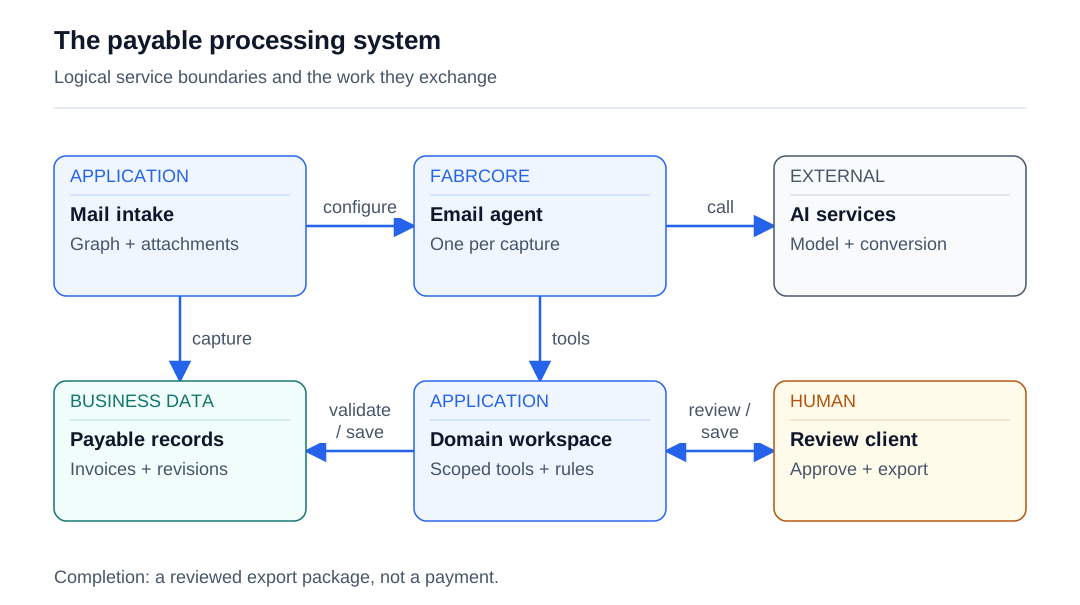
Read the diagram as text
- Intake configures the email-scoped FabrCore agent and sends document references.
- The intake service persists the email and attachment identities before extraction.
- The agent invokes the configured model and application document converter.
- Configured plugin tools reach application workspace services.
- The workspace validates extracted records and saves accounting revisions.
- The client reads evidence and submits human review actions through domain services.
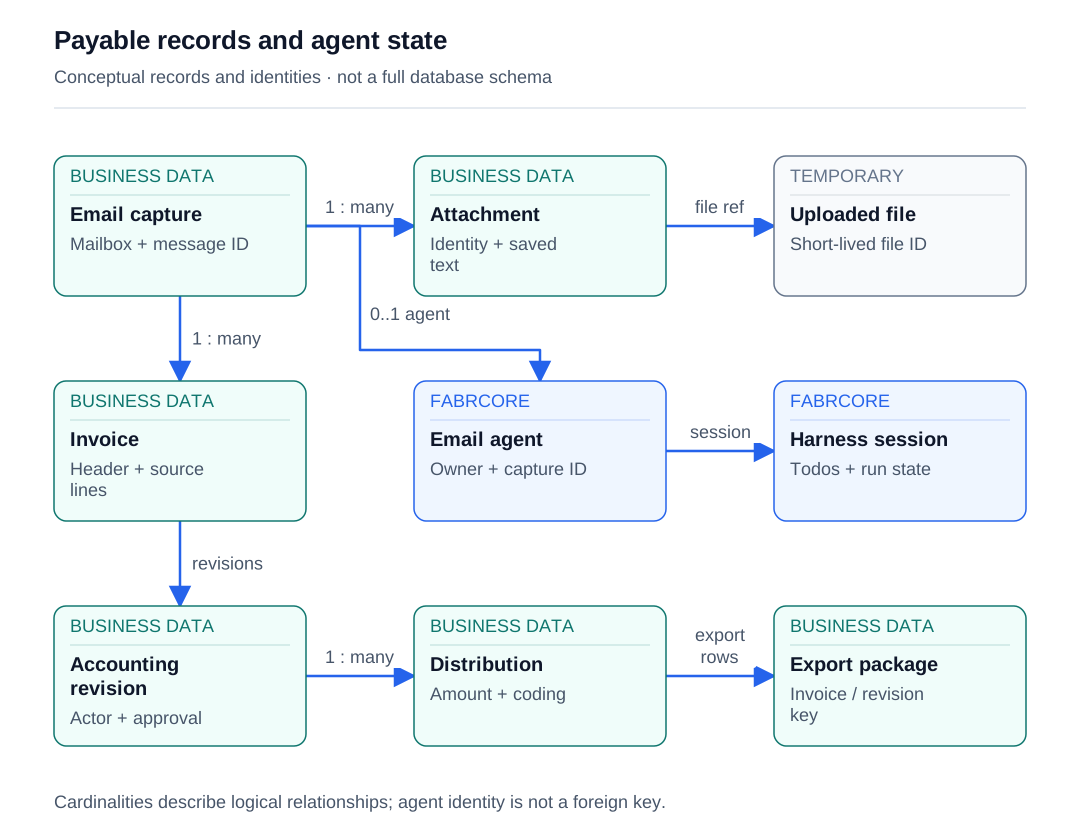
Read the diagram as text
- One captured email owns zero or more attachments.
- An eligible attachment is mapped explicitly to a temporary uploaded file.
- One email can produce multiple invoices.
- A capture may exist before its logical email agent is configured.
- The agent maintains harness state separately from business records.
- An invoice has saved accounting revisions, including human approval metadata.
- An accounting revision contains the reviewed distributions.
- The export serializes distributions from the selected approved revision.
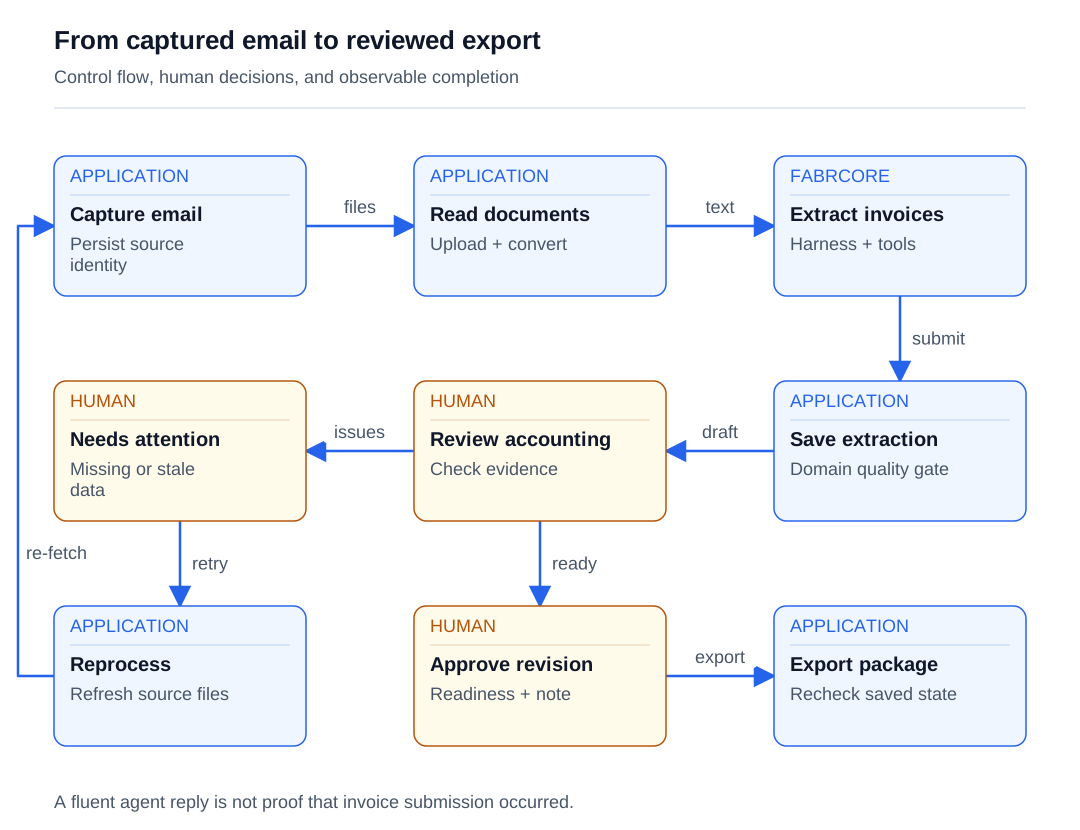
Read the diagram as text
- Capture precedes file preparation.
- Converted text supplies evidence to the extraction agent.
- The agent must invoke the submission tool to create extracted business records.
- Saved extraction and coding suggestions are reviewed by a person.
- Missing, conflicting, or stale values require attention.
- A person can explicitly reprocess incomplete extraction.
- Reprocessing re-fetches source evidence while reusing the capture identity.
- Approval requires a current revision, review note, and passing readiness checks.
- Export rechecks the approved revision; it does not mark a bill paid.
ONE POSSIBLE CLIENT EXPERIENCE
A possible web interface
Keep the source email, extracted invoice and accounting draft together. A reviewer can check the evidence, record a note and approve a saved revision before exporting the package.
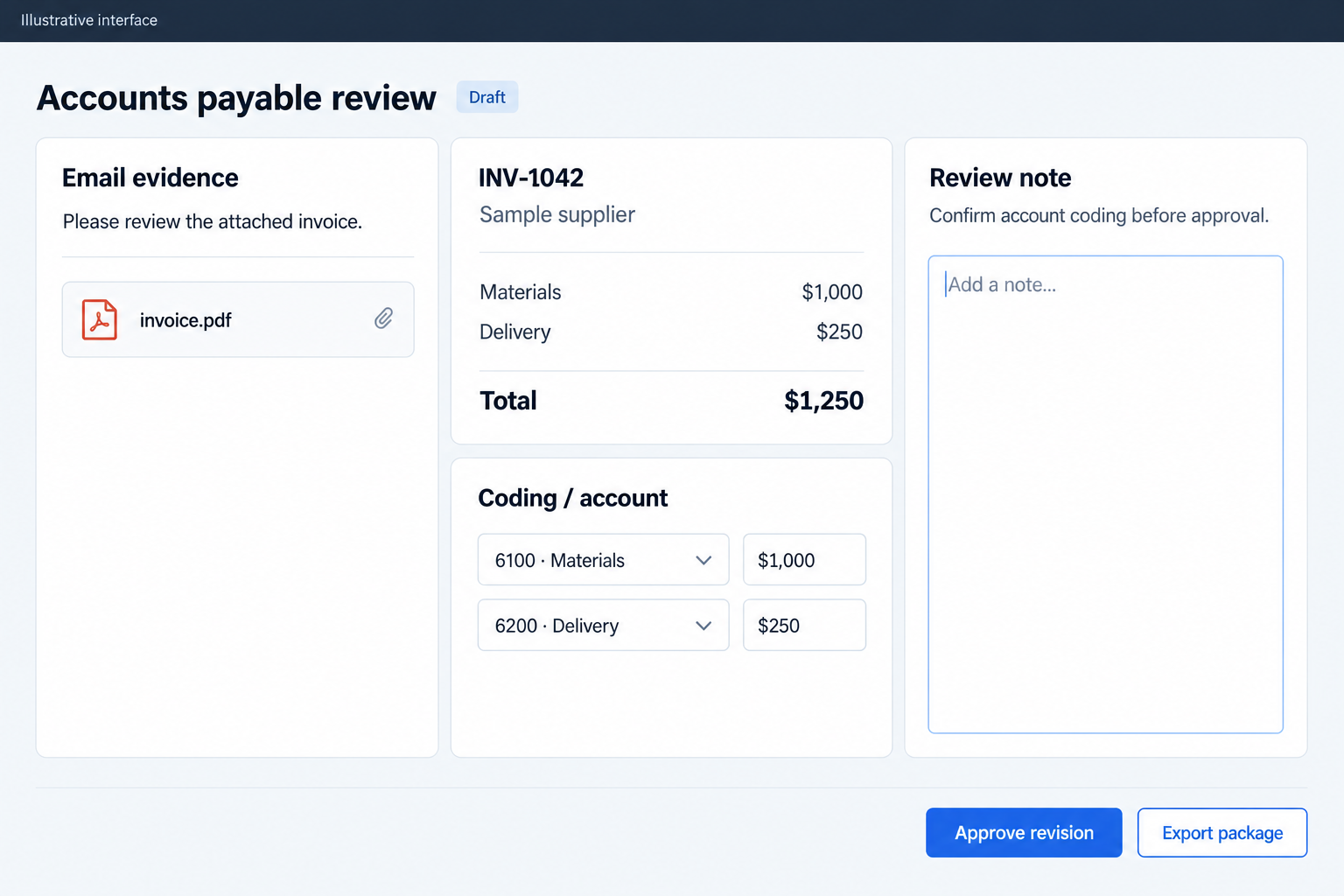
Follow the work
- Capture a selected vendor email and its attachments
- Configure the email's FabrCore agent and dispatch extraction
- Convert documents, extract invoices, and suggest accounting codes
- Review source evidence, correct the accounting draft, and approve it
- Submit the approved revision through a validated package export
Give each agent a clear lifetime
| Role | Lifetime | Responsibility | State |
|---|---|---|---|
| Mailbox intake service | Application service invoked by an operator action | Read registered mailboxes, capture evidence, resolve vendors, and dispatch extraction | Domain email and attachment rows, vendor associations, and processing activity |
| Invoice email agent | One logical FabrCore agent per captured email, reused across retries and chat | Coordinate document reading, extraction, optional vendor stages, and accounting preparation | Configuration, main conversation, harness session, and cached health measurements |
| Invoice tools plugin | Initialized with the agent; fresh dependency-injection scope for each domain operation | Expose capture-scoped writes and controlled vendor/history lookups | Provisioned capture identity and notification destination; business data remains in the domain store |
| Accounting classification session | Separate chat-client session per invoice mapping attempt inside the existing agent | Suggest missing codes from an allowed catalog without extraction tools | Session context plus persisted suggestions, reasons, and confidence in accounting revisions |
| Accounting reviewer | Human work across authenticated application sessions | Confirm source evidence, correct distributions and jobs, and approve accounting data | Saved draft revisions, review note, reviewer identity, and approval timestamp |
About the source and code examples
Adapted from a .NET 10 application using FabrCore.Host and FabrCore.Surface 2.0.0-local.20260910170410, including working-tree accounting additions, reviewed September 13, 2026. Examples are shortened excerpts with neutral identifiers and labeled application helpers, not a standalone project. Deployment configuration and organization-specific accounting rules are omitted.
Examples use neutral names. Application records, repositories and external adapters shown in excerpts are contracts you implement; they are not built-in FabrCore services. The client interface is yours to design.
1. Start with the email record
An accounts-payable workflow begins with an email and ends with a reviewed package someone can use. Between those points, a model must read unfamiliar documents, application code must protect business rules, and a person must resolve ambiguity. Build those responsibilities around a durable email record. The capture gives every invoice, attachment, processing message, and review decision a common identity, even when one email contains several invoices.
Persist the mailbox identity, provider message ID, internet message ID, envelope, normalized body text, and attachment metadata before calling the model. A unique mailbox/message pair makes repeated capture of the same provider identity safe. Keep the internet message ID as additional evidence. This distinction matters because capture deduplication and detection of a vendor resending an invoice are different problems.
The intake service reads a selected date range through Microsoft Graph, follows pagination to a configured cap, and fetches the chosen message. Processing starts with an operator action. Resolve the vendor through known contact addresses first and sender domains second, filtering house domains and shared billing platforms appropriately. Unknown senders go through vendor import; automatic creation defaults off. The first build checkpoint is a saved capture with a resolved vendor and traceable attachments. These are application records and commands; FabrCore will operate on them in the next step.
// EF configuration excerpt; EmailCapture is an application entity.
builder.HasIndex(e => new { e.MailboxId, e.GraphMessageId })
    .IsUnique();

// Application-service excerpt. Commands and helpers are application-owned.
var captured = await mediator.SendAsync(captureCommand, ct);
var match = await MatchVendorAsync(
    detail, createIfMissing: options.CreateVendorsAutomatically, ct);
if (match.VendorId is { } vendorId)
{
    await mediator.SendAsync(new AssignEmailVendorCommand(
        captured.Id, vendorId, match.Method, match.MatchKey), ct);
}
// Persist locally readable attachment text; defer layout documents.
await ReadAttachmentsAsync(mailboxAddress, captured, detail, ct);
Explore the features used here:
2. Add FabrCore and a shared automation identity
Host FabrCore in the application process with AddFabrCoreServer. This registers the agent runtime and Orleans hosting, while UseFabrCoreServer exposes the server endpoints. Agent and plugin aliases connect discovered types to later configuration. For a persistent deployment, configure SQL clustering under FabrCore:Orleans and the named application-services connection under FabrCore:Database. SQL support belongs to FabrCore.Host in this generation. Keep connection values and credentials in deployment configuration.
Choose a model configuration alias such as default. The alias separates agent code from the provider configuration, allowing the extraction and accounting stages to use the configured client without embedding a model endpoint in business logic. Register the application domain services before the agent uses them. The startup excerpt deliberately shows only the FabrCore boundary; authentication, migrations, and mailbox and document services remain ordinary application setup.
Give the agents an automation principal rather than ownership by whichever operator started processing. Colleagues can then address the same email agent across review sessions. FabrCore access control makes that sharing explicit: IAclEntityStore.UpsertPrincipalAsync creates or updates the identity, and UpsertGrantAsync records inbound AgentMessageAllow, AgentReadAllow, and outbound AgentMessageAllow grants. Granting permission to send work and permission to return progress are separate decisions. Define those grants for the intended accounting audience; a shared principal alone is not an authorization policy.
using FabrCore.Host;

var builder = WebApplication.CreateBuilder(args);
// Existing app setup supplies authentication, domain DI, migrations,
// mailbox/document services, and a model configuration named "default".
builder.AddFabrCoreServer();

var app = builder.Build();
app.UseAuthentication();
app.UseAuthorization();
app.UseFabrCoreServer();

// Existing application endpoints are mapped separately.
app.Run();
Explore the features used here:
3. Configure one agent per email
Derive the agent address from the capture ID: service:invoice-mail-<id>. This is one agent per email, not one per vendor or extracted invoice. ConfigureAgentAsync receives the owning principal and an AgentConfiguration containing the bare handle, agent-type alias, model alias, system prompt, plugins, and arguments. The configuration binds the agent to its business record even when it is activated without the original dispatch message.
Set ForceReconfigure=false when retrying so the operator keeps the existing conversation. Supply current vendor and work context on the new message. RegisterPrincipalAsync ensures the caller is available to receive progress. SendMessageAsync takes the owner and bare alias separately; passing the fully qualified target in the alias parameter would duplicate the principal prefix. AgentMessage also records OnBehalfOfHandle to retain the identity of the person behind a service-owned request.
Dispatch with MessageKind.OneWay. Extraction may take longer than an interactive request, so the client observes progress and reloads the business record instead of waiting for the final return value. A successful send means the request was dispatched, not that extraction committed. Set HarnessArgs.Loop to todo and LoopMaxIterations to eight to bound continuation over unfinished work. Keep business completion separate from both message delivery and the model's work plan.
// App-owned inputs: captureId, callerPrincipal, mailText, fileIds, systemPrompt.
const string owner = "service";
var alias = $"invoice-mail-{captureId:N}";
var args = new Dictionary<string, string>
{
    ["captureId"] = captureId.ToString(),
    ["principalHandle"] = callerPrincipal,
    ["invoice-tools:captureId"] = captureId.ToString(),
    [HarnessArgs.Loop] = "todo",
    [HarnessArgs.LoopMaxIterations] = "8"
};
// The full app also supplies vendor context and serialized document mappings.
await agentService.RegisterPrincipalAsync(callerPrincipal);
await agentService.ConfigureAgentAsync(owner, new AgentConfiguration
{
    Handle = alias, AgentType = "invoice-email", Models = "default",
    SystemPrompt = systemPrompt, Plugins = ["invoice-tools"],
    Args = args, ForceReconfigure = false
}, HealthDetailLevel.Basic);
var message = new AgentMessage
{
    ToHandle = $"{owner}:{alias}",
    OnBehalfOfHandle = HandleUtilities.BuildPrefix(callerPrincipal),
    MessageType = "ap-process", Kind = MessageKind.OneWay,
    Message = mailText, Args = args
};
message.Files.AddRange(fileIds);
await agentService.SendMessageAsync(owner, alias, message);
Explore the features used here:
4. Give the agent documents it can read
Keep mailbox credentials in the intake service. Transfer eligible attachment bytes to FabrCore's IFileStorageService, then send file IDs to the agent. SaveFileAsync writes the content; TrackFile separately sets the expiry used by cleanup. Use both calls. The workflow allows up to 25 MiB per upload and gives files a ten-minute lifetime. This keeps the handoff small without putting mailbox access in a model tool.
Alongside AgentMessage.Files, serialize a document map containing file ID, domain attachment ID, original name, content type, and size. Do not infer identity from list position: if an oversized document is skipped, every later association could move. At this checkpoint, the agent can connect each temporary upload back to the correct source attachment.
The agent calls GetFileAsync and passes the bytes to an application-owned converter. Layout documents become Markdown through Azure Document Intelligence; text formats are decoded locally. Persist the converted text against the attachment so context and reviewers can use it. Report expired files, unreadable documents, and truncation, then carry the available evidence forward. A retry uploads again. The temporary-file lifetime does not govern the retention of converted text, extracted data, or conversations, and the current processing path still reconverts uploads on reprocessing.
// Launcher excerpt; fileStorage is IFileStorageService.
using var upload = new MemoryStream(contentBytes, writable: false);
var fileId = await fileStorage.SaveFileAsync(upload, Path.GetExtension(fileName));
fileStorage.TrackFile(fileId, fileName, DateTime.UtcNow.AddSeconds(600));
// App-owned record serialized into message.Args["documents"].
documents.Add(new InvoiceDocument(fileId, attachmentId, fileName, contentType, size));

// Agent excerpt; converter and workspace are application-owned services.
var (stream, _) = await fileStorage.GetFileAsync(reference.FileId);
if (stream is null)
{
    await NoteDocumentFailureAsync(reference, "Upload expired; reprocess the email.");
    continue; // Inside the document loop.
}
await using (stream)
{
    using var buffer = new MemoryStream();
    await stream.CopyToAsync(buffer);
    var result = await converter.ConvertAsync(
        buffer.ToArray(), reference.Name, reference.ContentType);
    // Full implementation checks success and reports truncation before recording.
}
Explore the features used here:
5. Run extraction through the harness
Implement FabrCoreAgentProxy and declare an AgentAlias matching the configuration. OnInitialize reads the bound arguments, calls ResolveConfiguredToolsAsync, and creates a FabrCoreHarnessResult for thread main. Configured plugins become callable tools, and the harness adds a model-managed todo list and a continuation loop. One conversation follows the email through processing and later questions.
DisableAgentModeProvider=true removes the harness plan/execute approval mode from this extraction worker. The operator already requested processing, and accounting approval belongs to a later business step. OnMessage routes processing commands to extraction, accounting-only commands to mapping, and ordinary conversation to a chat handler. Chat reuses context without retrieving the uploaded documents again. It retains configured tools, so permission to chat is more than permission to read a transcript.
A processing attempt clears the previous harness session, records Extracting status, converts documents, and runs the extraction prompt. Call the result wrapper's RunAsync rather than the inner harness agent: the wrapper snapshots session state when the turn ends. ClearHarnessSessionAsync resets the plan without clearing persisted conversation history. GetAllTodosAsync lets the application report unfinished work before another stage clears it. OnEvent is unused here; SetStatusMessage and GetCustomHealthMetrics expose progress and cached measurements. Saved harness state helps restore context, but the durable invoice outcome remains in the application database.
[AgentAlias("invoice-email")]
public partial class InvoiceEmailAgent : FabrCoreAgentProxy
{
    private FabrCoreHarnessResult _harness = null!;
    public InvoiceEmailAgent(AgentConfiguration config, IServiceProvider services,
        IFabrCoreAgentHost host) : base(config, services, host) { }

    public override async Task OnInitialize()
    {
        ReadArgs(config.Args); // Application helper.
        var tools = await ResolveConfiguredToolsAsync();
        _harness = await CreateFabrCoreHarnessAgent(
            chatClientConfigName: config.Models ?? "default",
            threadId: "main", tools: tools,
            configure: options => options.DisableAgentModeProvider = true);
    }

    public override async Task<AgentMessage> OnMessage(AgentMessage message)
    {
        ReadArgs(message.Args);
        var response = message.Response();
        // Application helpers retain validation, error handling, and usage accounting.
        return message.MessageType == "ap-process"
            ? await RunExtractionAsync(message, response)
            : await AnswerAsync(message, response);
        // Accounting-only routing is omitted from this shortened excerpt.
    }
    public override Task OnEvent(EventMessage message) => Task.CompletedTask;
}
// Inside RunExtractionAsync, after preparing the prompt:
// await _harness.ClearHarnessSessionAsync();
// var run = await _harness.RunAsync(new AgentMessage { Message = prompt });
// var todos = await _harness.GetAllTodosAsync();
Explore the features used here:
6. Submit extracted values through domain rules
The model needs a small set of useful actions: read context, store document text, find or correct a vendor, check duplicates, submit invoices, report failure, and log progress. Package these as an IFabrCorePlugin with a PluginAlias and descriptions on callable methods. InitializeAsync receives AgentConfiguration, and GetPluginSetting reads the namespaced capture binding. The model supplies invoice values; it does not choose the email that receives the write.
Resolve a new dependency-injection scope inside each tool call. The agent's lifetime exceeds a request, so retaining a scoped database context would couple unrelated turns to stale or disposed state. Route writes through an application workspace and its domain commands. Vendor search and duplicate/history lookups intentionally reach outside the current capture; the write boundary is narrower than the read context.
SubmitInvoices accepts strings as printed and lets the domain parse dates, money, and quantities. Invalid JSON is returned as tool feedback so the model can correct it. The quality gate checks missing identifiers, dates, totals, supplied confidence below 80%, and arithmetic when enough values are present. Empty extraction results send the email for review. Suspected duplicates are stored and flagged rather than silently discarded. This tool submission creates extracted records; it cannot grant accounting approval. Re-extraction replaces eligible machine drafts while preserving approved work.
// Members of [PluginAlias("invoice-tools")] InvoiceTools : IFabrCorePlugin.
// ExtractionResult, ExtractedInvoice, and IInvoiceWorkspace are application contracts.
private Guid _captureId;
private IServiceScopeFactory _scopes = null!;
private string _agentHandle = "";

public Task InitializeAsync(AgentConfiguration config, IServiceProvider services)
{
    _scopes = services.GetRequiredService<IServiceScopeFactory>();
    _agentHandle = services.GetRequiredService<IFabrCoreAgentHost>().GetHandle();
    Guid.TryParse(config.GetPluginSetting("invoice-tools", "captureId"),
        out _captureId);
    return Task.CompletedTask;
}

[Description("Record extracted invoices for this email through domain validation.")]
public async Task<string> SubmitInvoices(string invoicesJson)
{
    if (_captureId == Guid.Empty) return "No capture is bound to this agent.";
    List<ExtractedInvoice>? invoices;
    try { invoices = JsonSerializer.Deserialize<List<ExtractedInvoice>>(
        invoicesJson, ReadOptions); } // App-owned lenient JSON options.
    catch (JsonException ex) { return $"Invalid invoice JSON: {ex.Message}"; }
    using var scope = _scopes.CreateScope();
    var workspace = scope.ServiceProvider.GetRequiredService<IInvoiceWorkspace>();
    var result = new ExtractionResult
    { Succeeded = true, ExtractedBy = _agentHandle, Invoices = invoices ?? [] };
    var outcome = await workspace.SubmitAsync(_captureId, result);
    return JsonSerializer.Serialize(outcome);
}
Explore the features used here:
7. Apply vendor guidance at the right point
Add vendor guidance after the basic extraction path works. Load the instructions once for the run so edits made halfway through processing do not change its rules unexpectedly. Optional precheck instructions decide whether to process the email at all. Processing instructions are folded into the extraction prompt with the email and converted documents. For example, a vendor's monthly statement can be recognized before its entries are mistaken for new invoices.
After extraction and accounting mapping, optional validation rereads the invoice records from the database. It checks what actually exists, rather than accepting the extraction summary as proof. Closing instructions then run as a final stage. These vendor stages share the main harness conversation, with the todo session cleared between stages so an old plan does not take over a new question.
Keep the strength of each check explicit. The current vendor stages parse a trailing VERDICT marker and continue when the marker is missing; a validation failure can flag review, while an inconclusive stage can merely log a warning. Their prompts prohibit unwanted writes, but the tools remain available. Domain validation and human approval therefore remain the firm business gates. Where a vendor rule must block submission, implement that requirement as an enforced application rule or a restricted stage.
Explore the features used here:
8. Prepare accounting suggestions without extraction tools
Once invoice records exist, build a separate accounting draft from their saved lines. Add tax, freight, and discount distributions explicitly so the total can be reconciled. Keep the draft separate from extraction: a reviewer should be able to correct coding without erasing what the document reader returned. If printed line amounts already include a charge, the reviewer removes the duplicate distribution rather than accepting an automatic balance adjustment.
Select the buying entity, its active chart of accounts, eligible cost codes, and the vendor accounting profile. Then call CreateChatClientAgent inside the existing email agent with tools:[] and a focused mapping prompt. This creates a separate model session, not another provisioned actor. Ask for one result per distribution number, with a code, confidence, and reason. Include only the catalog and invoice context needed for that decision.
Validate the returned coverage and catalog membership in application code. Unknown codes and low-confidence suggestions leave fields unresolved; existing selections are preserved. Save accepted suggestions as a machine revision through the same accounting workspace used by humans. Mapping cannot change amounts or approve the draft. A unique thread ID separates mapping attempts, although configured history may still persist. If mapping fails, the extracted invoice stays available for manual coding.
// Inside the existing proxy. Catalog filtering and prompt construction are app-owned.
var mapping = await CreateChatClientAgent(
    config.Models ?? "default", $"gl-{invoiceId:N}-{Guid.NewGuid():N}",
    tools: [], configureOptions: options =>
    {
        options.ChatOptions ??= new();
        options.ChatOptions.Instructions = mappingPrompt;
    });
var request = JsonSerializer.Serialize(new
{
    data.Entity,
    Accounts = catalog.Select(a => new { a.Code, a.Name, a.Usage, a.RequiresJob }),
    Distributions = unmapped.Select(d => new
        { d.Number, d.Description, d.Amount, d.JobNumber, d.GlCode })
});
var result = await mapping.Agent.RunAsync(request, mapping.Session);
var suggestions = JsonSerializer.Deserialize<List<CodingSuggestion>>(
    result.Text, ReadOptions) ?? throw new InvalidOperationException("No mapping result.");
// Application rules enforce catalog membership, coverage, confidence, and preservation.
CodingSuggestions.Apply(data, unmapped, suggestions, catalog, costs);
await workspace.SaveAsync(invoiceId, data, view.Revision, view.Fingerprint,
    fabrcoreAgentHost.GetHandle(), machine: true);
Explore the features used here:
9. Review the evidence and approve a revision
The human step starts from the source evidence, extracted invoice, proposed accounting data, and processing history. Reviewers complete missing dates and identifiers, correct or split distributions, select codes, and confirm jobs and project managers. Model confidence is useful context, but the decision is grounded in the document and accounting rules. Require a review note when the person approves the accounting data.
Protect this work with both an expected revision and a fingerprint of the underlying extraction. If extraction changed, the draft needs rebuilding. If another reviewer saved first, the stale writer must reload. SQL row-version protection catches concurrent updates, while full revisions preserve actor, action, and values. Saving or rebuilding clears earlier approval. The machine save path explicitly rejects approve=true and preserves already approved accounting drafts.
Keep clients loosely coupled through a neutral message contract. The agent uses IFabrCoreAgentHost.SendMessage to send a one-way data-changed message to the caller's principal. Its arguments identify the capture; the body identifies the changed area. The client checks that identity and reloads durable data. Such messages are refresh hints, not business events that commit approval.
Readiness combines source processing status, vendor eligibility and holds, entity/profile consistency, required dates, signed totals, balancing distributions, valid coding, and duplicate conflicts. Human accounting approval is a distinct recorded decision. It does not authorize payment or stand in for a project manager's approval.
// AccountingWorkspace.SaveAsync excerpt; all symbols here are application-owned.
if (before.Fingerprint != expectedFingerprint)
    throw new InvalidOperationException("Extraction changed. Reload this invoice.");
if ((saved?.Revision ?? 0) != expectedRevision)
    throw new InvalidOperationException("Another user changed this record.");
if (machine && saved?.ApprovedAtUtc is not null) return;
if (approve && machine)
    throw new InvalidOperationException("AI suggestions cannot approve a payable.");
if (approve)
{
    if (string.IsNullOrWhiteSpace(data.ReviewNote))
        throw new InvalidOperationException("A source-and-coding review note is required.");
    var issues = (await GetAsync(id, ct, data)).Issues;
    if (issues.Count != 0) throw new InvalidOperationException(string.Join(" ", issues));
}
// Full implementation saves the preparation, revision, and activity together.

// Separate export handler, protected by the application's admin policy.
var view = await workspace.GetAsync(id, ct);
if (!view.Ready)
    return Results.Conflict(new { Error = "Payable is not ready for export.", view.Issues });
var exportKey = $"{id:N}-r{view.Revision}";
// Serialize this saved approved revision; downloading does not mark it posted.
Explore the features used here:
10. Submit the approved package and recover deliberately
Finish with a guarded package export. Re-read the saved revision, recompute readiness, and require accounting approval before returning canonical JSON or CSV. An invoice/revision export key gives later consumers a stable identity for the package. JSON includes source references; accounting CSV has one row per distribution, so its repeated invoice-total column must not be summed. The export represents reviewed data ready for the next workflow step.
The current submit boundary produces a downloadable file. It does not write an external accounting record, transfer attachment bytes, or mark a bill posted or paid. Add a delivery adapter and durable outbox when actual remote submission becomes part of the workflow. A one-way message or queued request is not, by itself, a durable delivery-and-retry contract.
Make recovery equally concrete. Reprocess to refresh expired uploads and reuse the email agent. Request accounting-only mapping to work from saved drafts without rereading documents. Check the saved submission outcome independently of the todo list: a run can finish speaking without submitting, and unfinished todos currently produce warnings rather than a guaranteed blocking status. Duplicate marking also follows the first invoice save in a separate save operation.
Use FabrCore's LlmUsageScope for turn measurements. Book deltas into application activity and lifetime email totals, stamp reply arguments with ApplyTo, and expose cached health through GetCustomHealthMetrics. Together, the business record, revision history, and agent activity explain what happened, who approved it, and where a retry should begin.
Explore the features used here:
Prove the workflow end to end
Use these acceptance scenarios as you implement the story. They describe checks to run in your environment.
- Capture the same provider message twice and verify a single mailbox/message capture, while keeping re-extraction and invoice duplicate detection separate.
- Process an invoice plus a supporting attachment and verify each extracted record points to the document it came from.
- Expire an upload before retrieval, observe the document failure, and reprocess with a fresh file reference.
- Return malformed extraction JSON or missing invoice totals and verify correctable tool feedback or a review reason.
- Return an unknown accounting code, duplicate distribution number, or low-confidence mapping and verify that unresolved coding cannot become ready for approval.
- Save a draft from two reviewers and confirm that the stale revision is rejected; change extraction and verify an explicit rebuild is required.
- Attempt machine approval and unauthorized export; both must be refused. Approve a valid draft as an authorized reviewer with a note.
- Add a vendor payment hold after approval and verify that the export boundary blocks the previously ready package.
- Download the same approved revision twice and compare export keys; neither request should mark the bill posted, paid, or externally delivered.
- Interrupt a processing attempt and inspect the saved capture, submission outcome, activity, and restored agent context before retrying.
Implementation notes
Intake starts from an operator-selected email. The submission implemented here is a validated package download.
Accounting data approval is separate from project-manager approval, payment authorization, and posting.
Temporary upload expiry, persisted document text, conversation history, harness state, and accounting revisions have separate retention semantics.
One-way dispatch is not a durable delivery outbox. A remote submission adapter must own acknowledgement, retries, idempotency, and reconciliation.
Vendor stage verdicts can fail open, and unfinished todos do not guarantee a blocking business status. Enforce mandatory controls in application code.
Agent reuse preserves conversation but can retain initialized plugin settings, including an earlier notification recipient. Review access grants and cross-operator retries.
Examples omit supporting classes and full error handling; named domain helpers are application contracts rather than FabrCore APIs.