APPLICATION DEEP DIVE · Professional case and document management
From matter records to reviewed documents
Build focused FabrCore agents that read current communications and search scoped document knowledge, then add structured review to help a worker finish a generated document.
The finished workflow: Give workers contextual communication analysis, bounded document retrieval, and advisory document-review findings while business services and human actions remain responsible for record changes.
THE BUILD, AT A GLANCE
Architecture, records, and the path through the work
Explore three views of the same application. The data model shows conceptual relationships rather than a complete database schema.
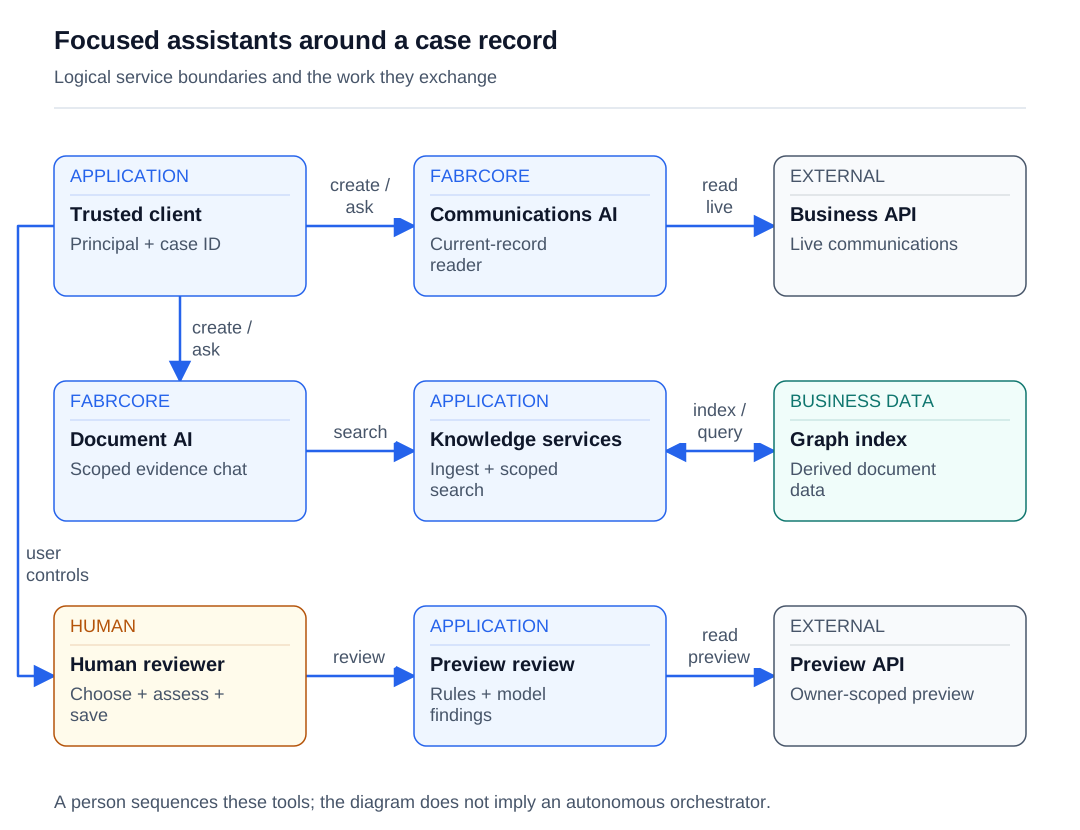
Read the diagram as text
- The trusted client creates and addresses the communications assistant.
- The communications plugin fetches current records from the business API.
- The client separately creates the document assistant for its case scope.
- Document chat calls the fixed-scope search plugin.
- Knowledge services explicitly ingest documents and search the derived graph.
- The person chooses the sequence; there is no orchestration agent connecting these assistants.
- The person requests review of a generated preview.
- The review service fetches the owner-scoped preview and returns sanitized findings.
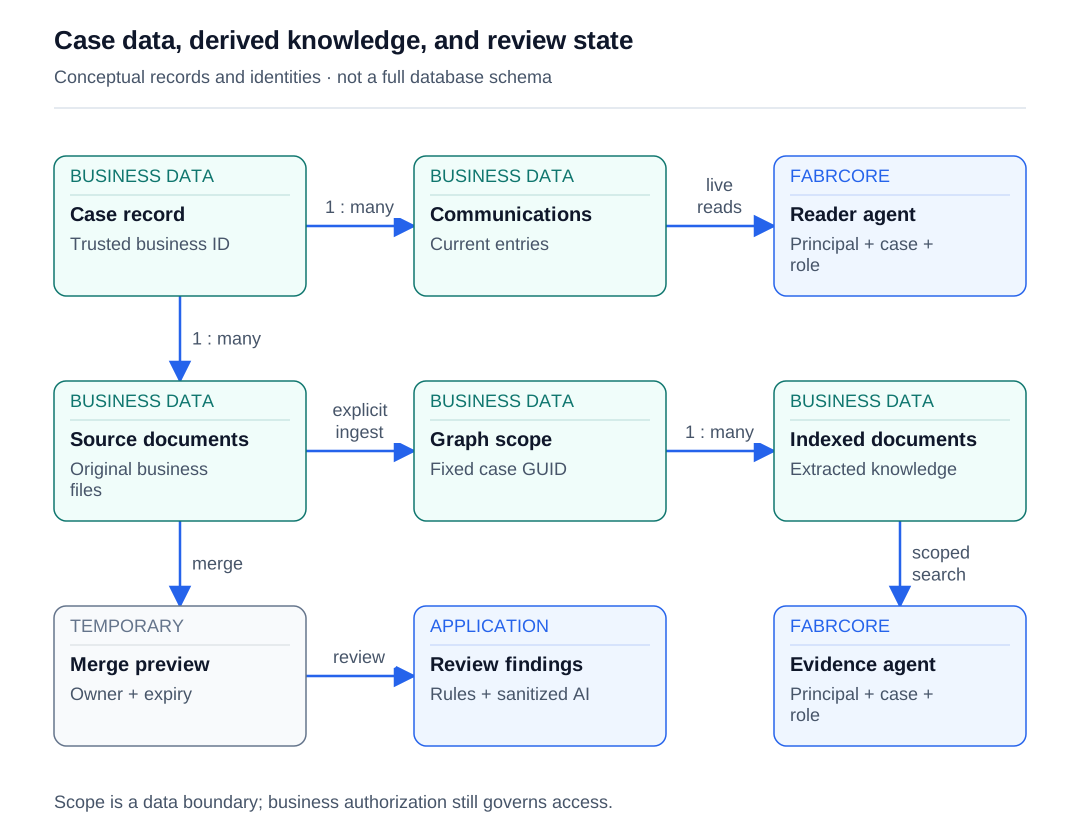
Read the diagram as text
- The case contains current communications.
- The communications agent reads current entries rather than a graph snapshot.
- The case references its source documents.
- Selected source documents are ingested under the fixed case scope.
- A prepared scope contains derived indexed documents.
- Document generation creates an owner-scoped temporary preview.
- A fresh review operation produces findings for that preview.
- The evidence agent retrieves only the configured scope.
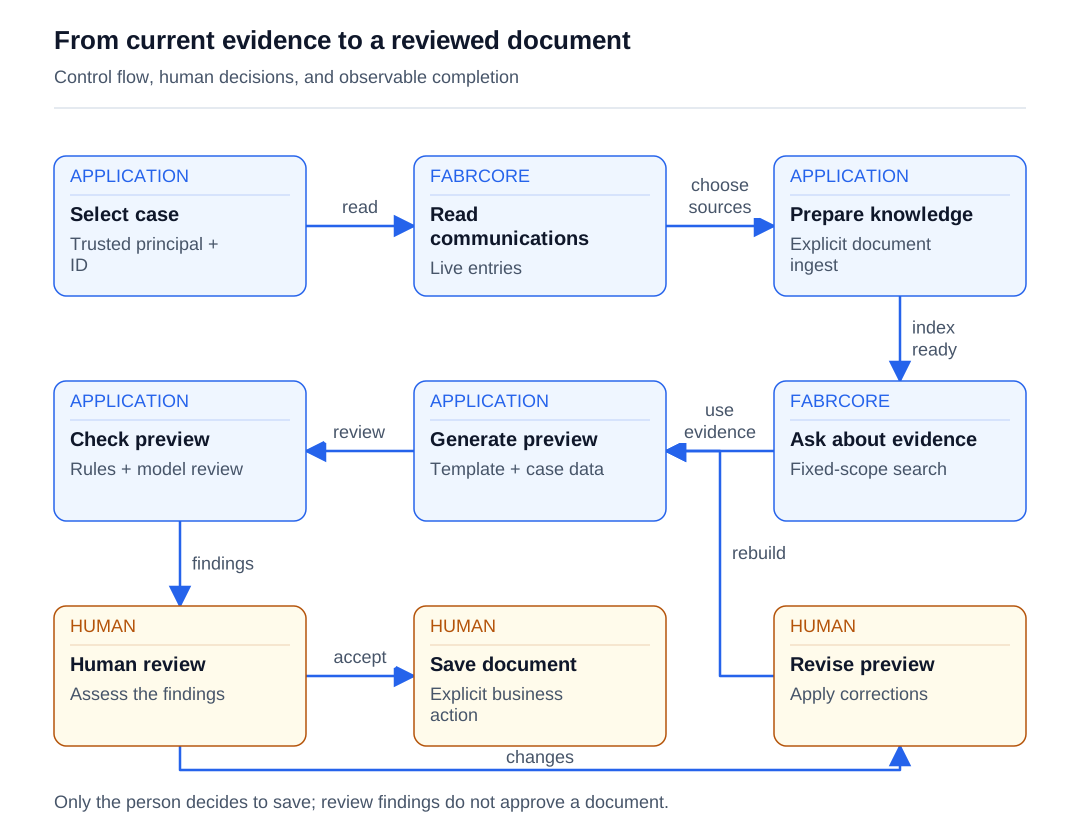
Read the diagram as text
- The person asks for current communications.
- The person selects documents for explicit knowledge preparation.
- Document chat can search the prepared graph scope.
- The person uses evidence while preparing a generated document.
- The preview receives deterministic and optional model review.
- Sanitized findings are advisory input to human review.
- The person chooses the supported save or download operation.
- If changes are needed, the person revises and rebuilds the preview.
- A revised preview returns through the review sequence.
ONE POSSIBLE CLIENT EXPERIENCE
A possible web interface
A client can bring indexed documents, evidence-backed answers and a document preview together. These are distinct backend capabilities that a person uses in sequence, with saving kept as an explicit action.
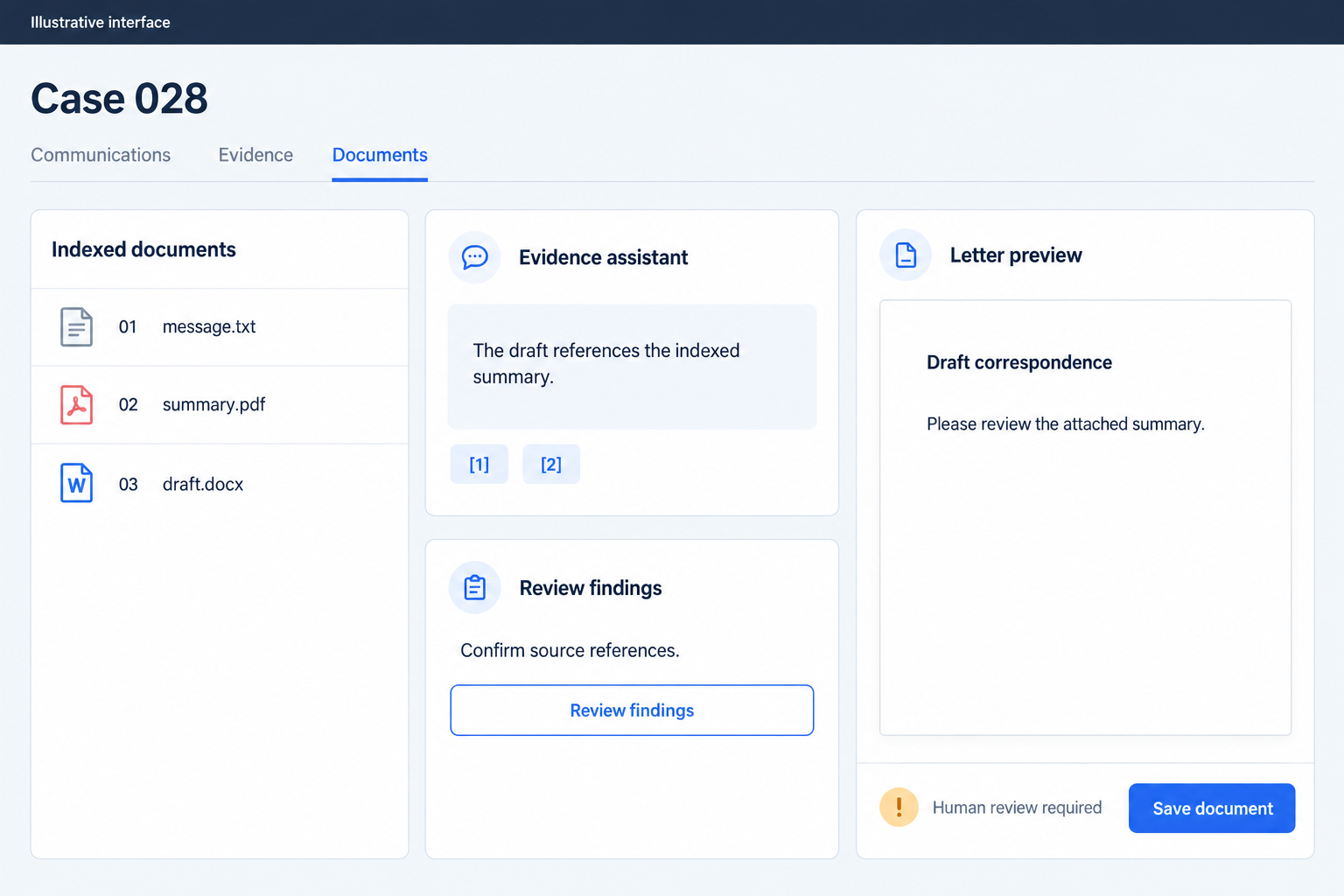
Follow the work
- Select an existing matter under the current application principal.
- Create a focused communications agent and read current API data.
- Explicitly ingest eligible documents into the matter's graph scope.
- Ask the document agent for bounded searches and evidence-grounded synthesis.
- Generate a template-based document preview through the business API.
- Run deterministic checks and optional structured model review on redacted preview data.
- Assess findings, then save or download; rebuild expired previews or address failed document ingestion.
Give each agent a clear lifetime
| Role | Lifetime | Responsibility | State |
|---|---|---|---|
| Communications assistant | Principal-context agent addressed by a stable matter-based alias. | Read current communications and answer focused questions, summaries, and follow-up requests. | AIAgent and AgentSession fields; history delegated to FabrCore; current records fetched from the API. |
| Document evidence assistant | Principal-context agent addressed by a stable matter-based alias. | Answer from explicitly indexed documents using bounded, fixed-scope search. | AIAgent and AgentSession fields, configured matter scope, and temporary status text. |
| Document ingestion service | Scoped service; one HTTP operation per add or remove request. | Discover and extract supported files, invoke GraphRAG ingestion, aggregate outcomes, and remove derived graph data. | Request-local worker outcomes; indexed knowledge stored through GraphRAG. |
| Merge review service | Scoped request/response service; fresh messages for each review. | Combine deterministic findings with optional sanitized structured model findings. | Request-local review data; source preview held separately in an owner-scoped API memory cache. |
| Case worker | Interactive business session. | Choose the matter, initiate indexing, assess evidence and findings, and explicitly save or download documents. | Current application principal, business record, and preview selections. |
About the source and code examples
Based on a .NET 10 application using FabrCore.Host and FabrCore.Surface 2.0.0-local.20260911081800, reviewed on 2026-09-13. Examples are adapted excerpts with neutral identifiers; omitted context and application-defined helpers are labeled. Runtime behavior and test results were not re-executed. Documentation follows the framework guide, whose /docs/knowledge route is marked as planned.
Examples use neutral names. Application records, repositories and external adapters shown in excerpts are contracts you implement; they are not built-in FabrCore services. The client interface is yours to design.
Start with a matter and a document to finish
Start with an existing matter: a business record that brings together communications, parties, tasks, dates, evidence, financial details, and documents. A worker preparing a follow-up letter needs several kinds of help. They need the latest conversation history, supporting evidence from documents, and a final check that the generated letter makes sense. FabrCore agents can supply that assistance while the business API remains responsible for authoritative records and changes.
Build this in increments. First add a communications assistant that reads the current record on demand. Next prepare document knowledge and attach a second assistant with a tightly scoped search tool. Finally add a request-based review service for a single generated document. These roles share model infrastructure, but each receives the data and lifetime appropriate to its job. The worker moves between them as the task requires.
This division keeps the processing understandable. Communication answers depend on live API data; document answers depend on an indexed graph; review findings depend on one preview. An answer can identify a gap, explain an inconsistency, or draft a report without silently becoming a saved communication or an approved document. Establish those boundaries before writing prompts. The FabrCore agent lifecycle then becomes the mechanism for carrying a focused conversation through the appropriate tools.
Explore the features used here:
Add an AI host and explicit configuration
Create an AI host alongside the business API and client application. The host registers FabrCore with the assembly containing the application-defined agents and plugins. AdditionalAssemblies makes that discovery choice explicit. Each agent and plugin can then publish an alias that AgentConfiguration uses later, keeping the client configuration independent of implementation class names.
Register GraphRAG when its database connection is available. The startup sequence below checks the named GraphRagDb connection first, then the Orleans storage and general connection settings. AddGraphRagServices connects knowledge processing to the named extraction model graphrag. Register the application ingestion service after that step, together with positive-value validation for its concurrency option. Calls that arrive without knowledge services can return an unavailable response instead of attempting extraction.
Assign model names by responsibility. The conversation agents use default, extraction uses graphrag, and generated-document review uses merge-review. These names let operators tune one workload without changing every caller. Resolve them through the effective local or cloud configuration for the selected environment. Keep connection credentials and provider settings in configuration, while assembly discovery, application services, and business authorization remain explicit startup choices. FabrCore's server and configuration APIs provide this separation between hosting, model selection, and application behavior.
builder.AddFabrCoreServer(new FabrCoreServerOptions
{
    AdditionalAssemblies = [typeof(Program).Assembly]
});

var graphConnection = builder.Configuration.GetConnectionString("GraphRagDb")
    ?? builder.Configuration["FabrCore:Orleans:StorageConnectionString"]
    ?? builder.Configuration["FabrCore:Orleans:ConnectionString"];

if (!string.IsNullOrWhiteSpace(graphConnection))
{
    builder.Configuration["ConnectionStrings:GraphRagDb"] = graphConnection;
    builder.Services.AddGraphRagServices(
        "GraphRagDb", extractionModelName: "graphrag");
}
Explore the features used here:
Carry trusted identity into the client contract
Before creating an assistant, establish the current principal and the matter being handled. The application resolves identity from its request or retained session context, normalizes the identifier, and supplies a principal context to the FabrCore client. That context is the client-side boundary for creating and addressing agents. It lets the application carry its existing user identity into the AI workflow instead of accepting a user identifier from the model.
The communications plugin later calls IFabrCoreAgentHost.GetUserHandle() and forwards that value through the application API client. This joins two responsibilities: FabrCore associates the agent with a principal, and the business API decides what that principal may read. A configured matter GUID is useful routing context, but it is not a substitute for record authorization. Private communication labels likewise retain their business meaning independently of the model.
Keep the client contract small: provide a target alias and AgentConfiguration when creating an agent, send an AgentMessage for a request, and handle its response and status separately. The processing code need not depend on a particular client presentation. This also makes failures easier to classify. An unresolved principal is an identity problem, unavailable agent health is a lifecycle problem, and a failed reader call is a data-access problem.
Explore the features used here:
Create one focused assistant from trusted context
Derive a stable agent alias from the matter GUID and the role. Communications and documents get separate aliases, so their instructions and tools stay focused. CreateAgent receives an AgentConfiguration and returns Task<AgentHealthStatus>. AgentType selects an AgentAlias, Models selects a named model, and Plugins lists the tool provider to load. ForceReconfigure=false is supplied when requesting the assistant with its existing configuration.
Put the matter identifier in Args under a plugin-specific key. The document reader receives its scope through configuration rather than a model-generated tool argument. In the adapted example, case-knowledge:CaseId is the agreed key between the client configuration and the plugin initializer. The matching plugin uses PluginAlias("case-knowledge"), and the agent uses AgentAlias("case-documents-agent"). Keeping those strings aligned is part of the application contract.
The creation configuration should stay deliberately small. It identifies the role, model, tools, and trusted business context. Detailed instructions belong with the agent implementation, while data-fetching logic belongs with the plugin. That separation makes the next increment straightforward: the document assistant can follow the same creation pattern as the communications assistant while receiving an entirely different reader.
var agentAlias = $"matter-{caseId:N}-documents";
return principal.CreateAgent(new AgentConfiguration
{
    Handle = agentAlias,
    AgentType = "case-documents-agent",
    Models = "default",
    Description = "Assistant grounded in this case's indexed documents.",
    Plugins = ["case-knowledge"],
    Args = new Dictionary<string, string>
    {
        ["case-knowledge:CaseId"] = caseId.ToString("D")
    },
    ForceReconfigure = false
});
// Extracted from an application creation callback; surrounding method omitted.
Explore the features used here:
Initialize tools, then handle a message
Implement each assistant as a FabrCoreAgentProxy. Its constructor receives AgentConfiguration, IServiceProvider, and IFabrCoreAgentHost and passes them to the base class. AgentAlias identifies the implementation, while Description, FabrCoreCapabilities, and FabrCoreNote describe what it does and the scope it expects. These declarations make the role discoverable without embedding implementation type names into the client.
OnInitialize combines the focused prompt with any additional configuration, calls ResolveConfiguredToolsAsync, and passes those tools into CreateChatClientAgent. The helper returns an AIAgent and AgentSession, which the assistant retains for subsequent messages. This gives the conversation a consistent session while delegating history handling to FabrCore. Business records remain in the API and document knowledge remains in GraphRAG; they do not become custom agent-state fields.
OnMessage turns the incoming AgentMessage into a user ChatMessage and runs the model with that session. message.Response() creates the response envelope, and update.Text is accumulated until the run completes. The result is one returned message even though model execution uses RunStreamingAsync internally. SetStatusMessage communicates progress independently; the document agent clears it in finally so a failed request does not leave a stale working indicator. Session lifetime supports follow-up questions, while tool invocation brings in the evidence needed for the current answer.
public override async Task OnInitialize()
{
    config.SystemPrompt = string.IsNullOrWhiteSpace(config.SystemPrompt)
        ? FocusedSystemPrompt
        : $"{FocusedSystemPrompt}\n\nAdditional configuration:\n{config.SystemPrompt}";

    var tools = await ResolveConfiguredToolsAsync();
    var result = await CreateChatClientAgent(
        config.Models ?? "default",
        config.Handle ?? fabrcoreAgentHost.GetHandle(),
        tools);
    _agent = result.Agent;
    _session = result.Session;
}

public override async Task<AgentMessage> OnMessage(AgentMessage message)
{
    SetStatusMessage("Reviewing case documents...");
    try
    {
        var response = message.Response();
        var chatMessage = new ChatMessage(
            ChatRole.User, message.Message ?? string.Empty);
        await foreach (var update in _agent!.RunStreamingAsync(chatMessage, _session!))
            response.Message += update.Text;
        return response;
    }
    finally
    {
        SetStatusMessage(null);
    }
}
Explore the features used here:
Read current communications through a narrow plugin
Implement the communications reader as IFabrCorePlugin. InitializeAsync resolves the host, API client, and logger, forwards the host's user handle, and parses its configured matter GUID. The public read tool takes no matter argument. Its job is simply to load the current matter detail and turn the returned communications into a useful text record.
Order pinned entries first, then newest first. Include category, author, creation and modification times, pinned and private labels, and the communication content. This preserves context a summary could otherwise lose: a pinned instruction may matter more than a newer routine note, and an edited entry should carry its updated timestamp. The agent's focused prompt asks it to read before answering content-dependent questions and to separate recorded facts from analysis.
Returned titles and content are untrusted data. The prompt says to ignore instructions embedded in that material and avoid inventing missing events. Missing configuration and API failures produce an explicit unavailable-record result. The reader currently returns the whole collection, so large histories need a deliberate size policy when extending the workflow. Access filtering belongs in the business data path; formatting a private label does not enforce who may see the entry. FabrCore supplies tool invocation, while the application owns these data semantics.
public Task InitializeAsync(
    AgentConfiguration config, IServiceProvider serviceProvider)
{
    var host = serviceProvider.GetRequiredService<IFabrCoreAgentHost>();
    _apiClient = serviceProvider.GetRequiredService<ICaseApiClient>();
    _apiClient.SetDefaultUserId(host.GetUserHandle());

    var configuredId = config.GetPluginSetting("case-reader", "CaseId");
    if (Guid.TryParse(configuredId, out var caseId))
        _caseId = caseId;

    return Task.CompletedTask;
}
// ICaseApiClient.SetDefaultUserId(string?) forwards application identity.
// Reader fields, public read tool, formatter, logging, and error handling omitted.
Explore the features used here:
Prepare document knowledge with bounded workers
Add document processing only after the current-record assistant works. Preparation begins by loading the matter, deriving its canonical GUID scope key, and creating that scope if necessary. Discover eligible files recursively before starting workers. Convert each file into text or Markdown, then send its normalized filename, scope key, and content to FabrCore through KnowledgeIngestionRequest.
Extraction handles Word files, spreadsheets and CSV, PDFs, email files, Markdown, JSON, and XML. Legacy Word and RTF use a PDF conversion path. Each worker owns its download stream and parser resources. PDF extraction reads embedded page text, so scanned pages without text require an OCR path before they can contribute evidence. A supported extension alone does not guarantee useful extracted content.
Bound the work at two levels. MatterGraph:MaxConcurrentDocuments defaults to two and must be positive; the separate GraphRag:Ingestion:MaxConcurrentChatCalls setting is four. Parallel.ForEachAsync limits document workers for one ingestion invocation. Each worker records an outcome in its own slot, and aggregation runs after completion. Completed documents count as new or reused; extraction failures and non-completed ingestion statuses become individual errors. This allows a batch to preserve successful work while explaining what still needs attention. Cancellation flows through downloads and ingestion, with synchronous parsing reaching the next cancellation checkpoint before it stops.
{
  "MatterGraph": {
    "MaxConcurrentDocuments": 2
  },
  "GraphRag": {
    "Ingestion": {
      "MaxConcurrentChatCalls": 4
    }
  }
}var graphDocument = await ingestionService.IngestDocumentAsync(
new KnowledgeIngestionRequest(
document.GraphFileName, scopeKey, markdown),
workerCt);
if (string.Equals(
graphDocument.Status, "Completed", StringComparison.OrdinalIgnoreCase))
{
outcomes[index] = new DocumentOutcome(graphDocument.Reused, null, false);
}
// document, DocumentOutcome, outcomes, and extraction are application-defined.
// In the source, non-completed status and exceptions become per-document errors.Explore the features used here:
Search a fixed scope and bound the evidence
The document assistant's plugin exposes SearchMatterDocuments(query, limit), with six results as the default. It derives scopeKey only from the configured GUID. The model can refine its question and requested result count, but it cannot supply another matter's scope. Before searching, the plugin verifies that the scope exists and contains indexed documents, returning a useful explanation when preparation is missing.
Create a dependency-injection scope for each invocation and resolve the GraphRAG services inside it. The plugin is initialized from a root provider, so this explicit scope accommodates the knowledge services' lifetimes. Clamp the result limit to one through eight and the trimmed query to 2,000 characters. Then call HybridSearchAsync with graphDepth one and a vector candidate limit bounded between six and twelve. Those bounds keep a conversational lookup focused.
Limit returned search text to 12,000 characters and report whether it was truncated. Include the indexed document count and mark the evidence as untrusted data. The focused agent prompt favors one narrow search, followed by additional searches when comparison, chronology, or incomplete evidence requires them. Ask for source identification when available and an honest explanation when the graph cannot support an answer. The assistant can synthesize evidence and draft explanations, but its attached tool cannot upload, edit, delete, or ingest documents.
var boundedLimit = Math.Clamp(limit, 1, 8);
var boundedQuery = query.Trim();
if (boundedQuery.Length > 2_000)
    boundedQuery = boundedQuery[..2_000];

var request = new ScopedSearchRequest(
    Query: boundedQuery,
    Scopes: [scopeKey],
    Limit: boundedLimit);

var results = await searchService.HybridSearchAsync(
    request,
    graphDepth: 1,
    vectorLimit: Math.Clamp(boundedLimit * 2, 6, 12));
// scopeKey comes only from the plugin's trusted configured GUID.
// The application bounds returned text before exposing it to the model.
Explore the features used here:
Review one preview while the person remains in control
Once the worker has enough context, generate a document from a template and review its preview. Pass a short-lived preview handle to the review service rather than the document itself. The business API checks the handle owner and matter identifier, then supplies redacted field values and extracted text. Known restricted merge values are withheld before model review. The preview remains an authoritative application artifact with its own lifetime.
Use a plain scoped service for this step. A review needs fresh messages and structured findings about one document, rather than the conversation history of a persistent assistant. Run deterministic checks first: unresolved tokens, placeholders, missing required values, date ordering, arithmetic, and unapproved narrative blocks. Then use IFabrCoreChatClientService to resolve merge-review and request a typed response with temperature zero. Bound document text to 24,000 characters, bound the field lists, and give the model call a ninety-second budget.
Ask the model for problems that need reading comprehension, such as a recipient in the wrong role, prose contradicting a merged value, or a sentence broken by an empty field. Sanitize the findings before presenting them: remove unknown token references, clear invalid field paths, cap text and finding counts, and downgrade weakly supported errors. AI findings remain advisory. The worker decides whether to save or download, and an unavailable model does not erase deterministic findings or prevent that decision.
var chatClient = await chatClientService.GetChatClient("merge-review");
// Source handles a missing client before this call.
var response = await chatClient.GetResponseAsync<ReviewModelOutput>(
    messages,
    new ChatOptions { Temperature = 0 },
    cancellationToken: budget.Token);

if (!response.TryGetResult(out var result) || result is null)
    return new ModelReview(false, "The review did not return a usable result.", []);

return new ModelReview(
    true, null, ReviewFindingSanitizer.Sanitize(result.Findings, preview));
// Neutral names replace application DTOs and helpers.
// This excerpt belongs inside the source-style timeout/error-handling block.
Explore the features used here:
Finish with explicit recovery boundaries
Recovery should preserve the distinctions established at the start. A failed communications read means the current record is unavailable. An empty graph means documents need preparation. A partially successful ingestion means some knowledge is ready and other files need attention. Return those conditions directly instead of letting the model fill the gaps. Clear agent and plugin status in finally so progress messages reflect completed work.
Ingestion runs within an HTTP request; its worker loop and folder queue are not durable jobs. The client allows two hours for this long operation and removes automatic resilience handlers to avoid silently repeating a mutating request. Concurrent submissions still have independent document-worker limits. They can overlap, so application-wide throttling, deduplication, and restart recovery need explicit policies if the workload grows beyond this request-based approach.
Removing a graph deletes derived knowledge without deleting original files. The removal service processes document batches and has a scoped transactional cleanup fallback for SQL timeouts. Preview recovery is lighter: an owner-scoped memory cache gives previews a thirty-minute intended lifetime, and an expired or evicted preview must be rebuilt. Finish by testing fresh data, bounded retrieval, cancellation, partial failures, owner checks, and model unavailability. The successful outcome is a worker reaching a supported save decision with useful evidence and clear findings, even when one AI operation cannot complete.
Explore the features used here:
Prove the workflow end to end
Use these acceptance scenarios as you implement the story. They describe checks to run in your environment.
- Add a communication after an earlier answer; invoke the reader again and verify the new entry, author, timestamps, and pinned/private labels are included.
- Create document agents for two matters; search each and confirm every knowledge request uses only that agent's configured GUID scope.
- Ask for another matter's documents in chat; verify the tool exposes no scope argument and search remains within the configured scope.
- Request a matter under an unauthorized identity; verify the business data path denies access independently of model instructions and graph scope.
- Index a mixed batch with valid text, a failed download, and a PDF without extractable text; verify successful files remain available and failures are reported individually.
- Cancel ingestion during download and during model processing; verify cancellation reaches workers and no completed sibling outcomes are misreported.
- Submit overlapping ingestion requests and confirm each respects its document-worker limit while overall concurrency is measured separately.
- Search with an oversized query and result limit; verify the query is capped at 2,000 characters, the result limit stays between one and eight, and oversized evidence reports truncation.
- Reset an agent and restart the host using the chosen storage configuration; verify the intended conversation-history behavior without changing source business records.
- Fetch a preview as its owner, as another user, and after expiration; only the valid owner request should return its data.
- Make the review model unavailable or exceed its budget; verify deterministic findings remain useful and the worker can still choose the supported save/download path.
- Remove the matter graph, then search again; verify derived knowledge is unavailable while original documents remain accessible through their business service.
- Review a generated document with an incorrect recipient role and unresolved fields; verify model findings complement deterministic findings and neither automatically approves or saves the document.
Implementation notes
Ingestion workers and folder discovery queues are request-local, not durable jobs; repeated submissions are not coalesced.
Document answers use explicitly indexed knowledge. Source changes require a deliberate refresh policy, and scanned PDFs need an OCR extraction path.
Fixed scope and forwarded identity complement business authorization; a private label is metadata rather than access enforcement.
Tool-use and untrusted-content instructions guide the model. The communications reader currently returns the full collection, so large histories need an explicit size policy.
Agent history belongs to the configured FabrCore lifecycle and storage. Business records, derived graph data, and short-lived preview state have separate lifetimes.
Review redaction covers known restricted merge values, not arbitrary sensitive prose. Model findings are sanitized advice and never final approval.
Saving or downloading is a human-initiated business operation; these assistants do not autonomously mutate source records.