APPLICATION DEEP DIVE · Freight operations
From email to reviewed shipment orders
Follow an incremental build from a durable order record to a FabrCore agent that reads shipment instructions, resolves business identifiers, validates its work, supports dispatcher corrections, and records downstream submission results.
The finished workflow: Turn an email thread and its attachments into reviewable shipment orders, with conditional automatic submission and explicit recovery paths.
THE BUILD, AT A GLANCE
Architecture, records, and the path through the work
Explore three views of the same application. The data model shows conceptual relationships rather than a complete database schema.
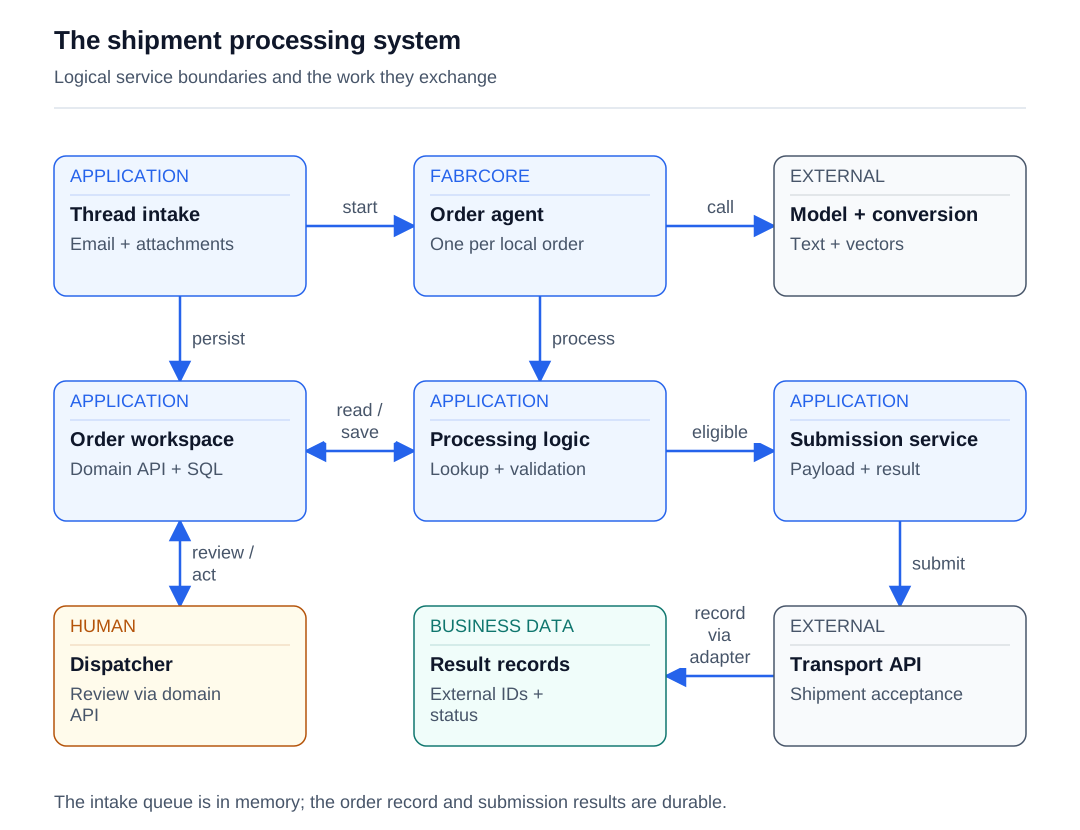
Read the diagram as text
- The coordinator configures the order agent and dispatches email content.
- A durable local order is created before queuing processing.
- Extraction uses model, file conversion, and embedding integrations.
- Application processing coordinates lookups and deterministic validation.
- Lookup and processing services read business data and save order state.
- Application control flow invokes submission after automatic eligibility or human approval.
- Dispatchers read and change orders through the domain API, not direct database access.
- The submission service sends each shipment payload to the transport API.
- The application adapter records API responses and accepted external identifiers.
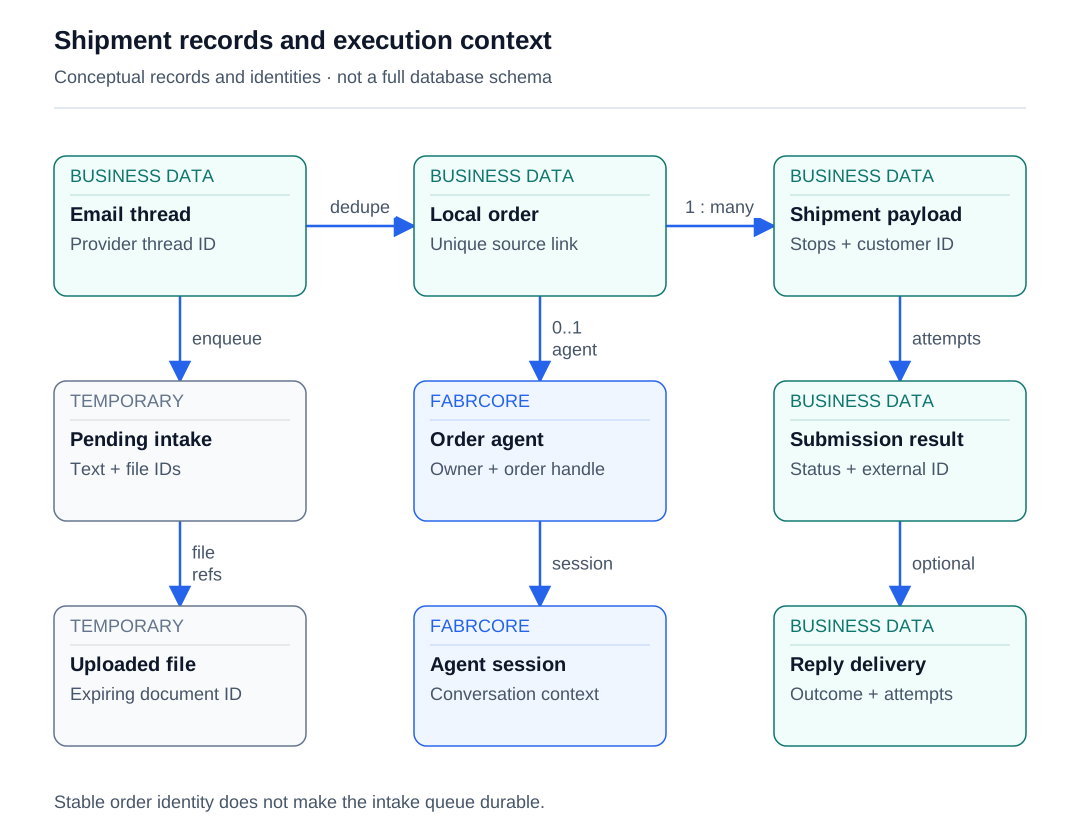
Read the diagram as text
- The local order deduplicates intake using its source thread identity.
- One local order can contain multiple shipment payloads.
- Pending intake holds queued content in memory.
- Pending content references temporary uploaded attachments.
- The logical agent is configured for an already-created local order.
- The agent session is distinct from the saved order state.
- Submission results retain accepted IDs and failures per shipment.
- Enabled outcome replies have separate persisted delivery records.
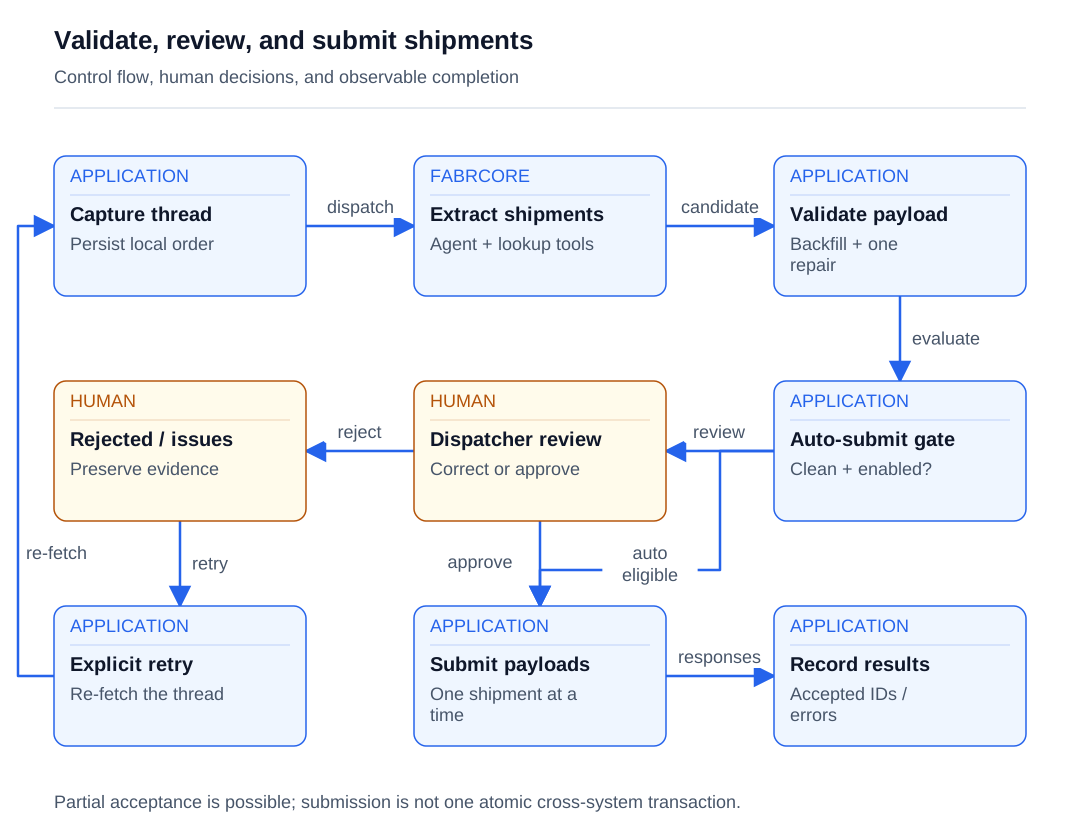
Read the diagram as text
- The saved order is dispatched to its agent.
- Extraction is followed by deterministic validation and a bounded repair attempt.
- Automatic submission requires clean results and configured eligibility.
- Ineligible or uncertain results enter human review.
- A dispatcher can reject or leave unresolved work for correction.
- Explicit retry reconstructs source-thread content.
- Retry reuses the local order and re-fetches the thread.
- Human approval invokes the application submission path.
- Eligible clean results bypass manual review.
- Persist partial successes and failures for explicit reconciliation.
ONE POSSIBLE CLIENT EXPERIENCE
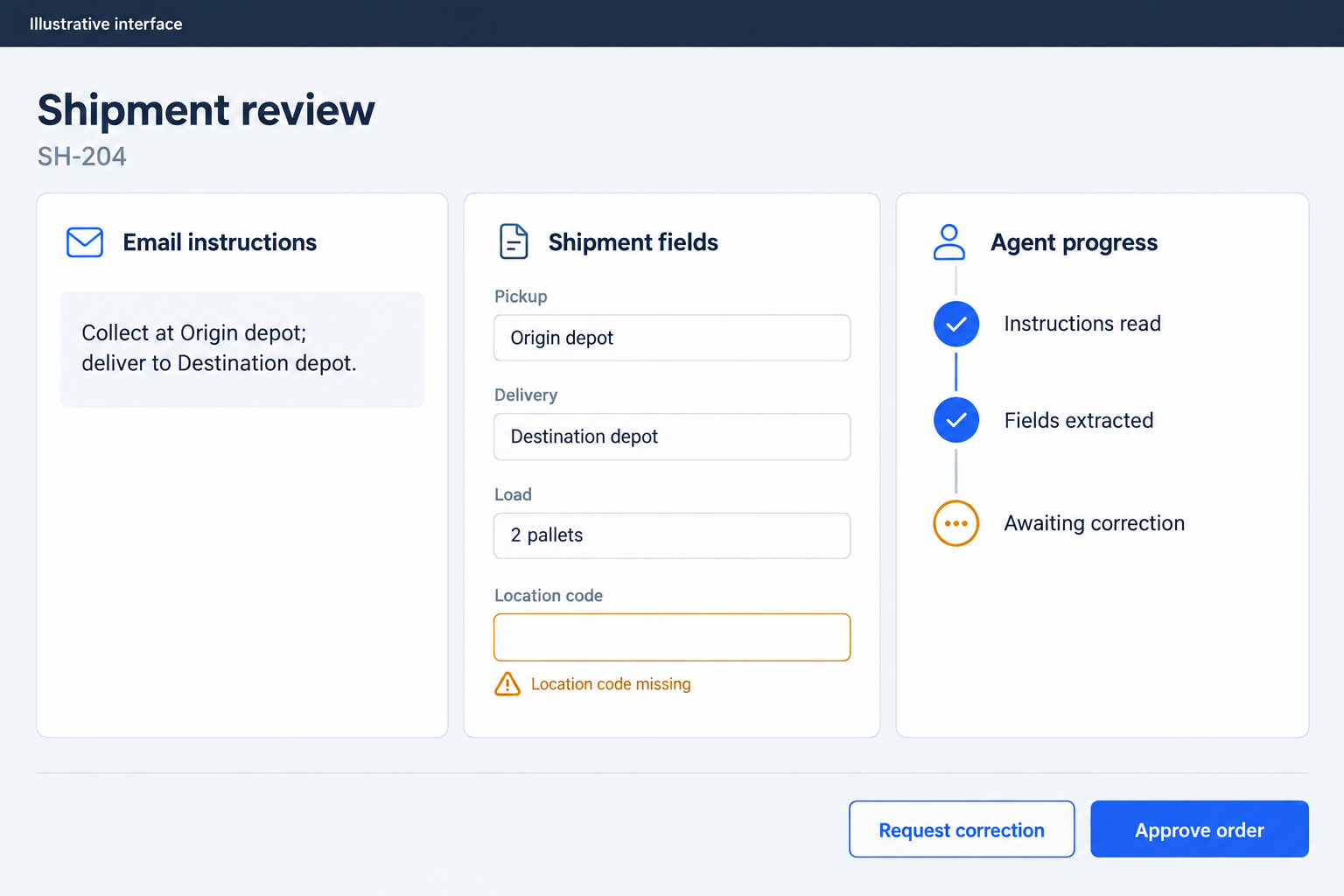
A possible web interface
Show the incoming instructions beside the proposed shipment and its unresolved validation issues. Agent updates keep the review current; the dispatcher corrects the fields and chooses when to approve.
Follow the work
- Read a complete email thread and identify eligible manual or automatic intake.
- Upload attachments, create the durable order record, and queue its identifier.
- Configure one FabrCore agent per order and send content, file references, and metadata.
- Identify the customer, load internal instructions, and extract shipment payloads with lookup tools.
- Backfill and verify stop locations, validate the payload, and attempt one corrective model turn.
- Auto-submit only eligible clean results; otherwise let a dispatcher review, revise, approve, or reject.
- Record downstream results, publish UI updates, and optionally queue outcome replies.
- Reload durable state for later actions or explicitly re-fetch and reprocess the source thread.
Give each agent a clear lifetime
| Role | Lifetime | Responsibility | State |
|---|---|---|---|
| Intake coordinator | Scoped service invoked by a page or background worker | Deduplicate intake, persist the initial order, upload files, and configure or message its agent. | Durable order identity and source-thread association; temporary pending email content. |
| Order processor agent | One logical FabrCore handle per order; proxy and session initialized on activation | Coordinate extraction, validation, dispatcher conversation, and submission. | In-memory phase and extraction context, a chat session, and a database-backed business-state projection. |
| Reference lookup tools | One tool object per agent initialization; fresh service scope per lookup | Resolve customers and verified locations and retrieve recent customer orders. | Reference records and embeddings live in application services; tool responses are serialized lookup results. |
| Dispatcher command client | A client interaction with the existing order agent | Read order state and send questions, corrections, approval, or rejection. | A projection of durable order state; the shared dispatcher principal owns agent routing. |
| Submission and reply services | Scoped submission operations and a hosted reply worker | Submit individual shipment payloads, retain responses, and deliver enabled outcome notifications. | Durable external identifiers, response bodies, audit events, and separately persisted reply deliveries. |
About the source and code examples
Adapted from a .NET 10 application using FabrCore.Host, FabrCore.Sdk, and FabrCore.Surface 1.6.3, at a source revision dated 2026-08-28. Examples preserve that generation's API call shapes with neutral names and explicitly labeled application helpers; they are excerpts, not a standalone sample project. Documentation may describe a different SDK generation.
Examples use neutral names. Application records, repositories and external adapters shown in excerpts are contracts you implement; they are not built-in FabrCore services. The client interface is yours to design.
Start with a record a dispatcher can recover
The business problem begins with a thread of shipment instructions. A sender may attach several documents, amend trailer assignments in later replies, and describe more than one truck. The useful output is a set of shipment payloads tied to a reviewable local order. Build that local record first: identity, source-thread reference, processing status, extracted JSON, validation findings, downstream results, and timestamps. The database gives the team something concrete to reopen when a browser closes or an agent restarts.
Both the manual Process action and automatic intake converge on the same coordinator. It looks for an existing order associated with the thread, uploads available attachments, and creates the order before enqueueing work. A filtered unique database index on the source-thread identifier handles simultaneous requests; the losing insert returns the already-created order. Automatic intake adds direct-message classification, ignored-thread checks, and a matched customer's AutoProcess setting. Push notifications and polling share that evaluation logic.
The queue contains order identifiers, while a separate concurrent dictionary holds pending email content and uploaded file identifiers. Both are in memory. Persisting the order before enqueueing prevents an invisible request, but it does not make pending execution durable. This distinction belongs in the initial design: a saved row can survive a process failure while its queued content cannot. The recovery path later in the story explicitly re-fetches the thread.
At this first milestone, the developer can verify intake without asking the model to solve anything: a request produces an order identifier, duplicate intake returns the existing record, and the worker can resolve its coordinator in a service scope. The application uses an unbounded channel with one reader and multiple writers. That is a straightforward local work queue. Add backlog limits, distributed consumption, or cross-process work leases when the workload calls for those capabilities.
// Application contracts, not FabrCore SDK APIs.
// AttachmentInfo, ProcessEmailResult and OrderProcessingOrigin
// are application-defined types omitted from this excerpt.
Task<ProcessEmailResult> ProcessNewEmailAsync(
    string emailContent, string? emailSubject = null,
    string? fromAddress = null, string? emailThreadId = null,
    string? lastProcessedMessageId = null, int processedMessageCount = 0,
    List<AttachmentInfo>? attachments = null,
    OrderProcessingOrigin processingOrigin = OrderProcessingOrigin.Manual,
    string? customerId = null);

// Persist the order before calling this application queue contract.
ValueTask EnqueueAsync(string orderId,
    CancellationToken cancellationToken = default);
Host the processor beside the business services
The application hosts FabrCore alongside its SQL-backed business services. AddFabrCoreServer registers the runtime, while AdditionalAssemblies makes the assembly containing the custom agent available for discovery. Register the order worker after the FabrCore server so the Orleans hosted service starts before queue consumption. The coordinator can then configure and message agents through IFabrCoreAgentService. This arrangement keeps business persistence, reference lookups, and agent orchestration in one service composition.
Configuration has distinct responsibilities. FabrCore:HostUrl points local file and embedding clients at the embedded host. FabrCore:Orleans holds cluster settings. OrderAgent:Model selects a named model configuration, with low-reasoning as the coordinator's fallback. The alias identifies a configured model, not a hard-coded deployment. Provision that alias alongside default and embeddings so extraction, general conversation, and vector generation can resolve the models they need. Hosted cloud configuration and remote administration settings provide an operational configuration path.
Give each environment an explicit submission policy. The base settings disable external order creation, while a production override enables it. This switch controls the final business effect independently of whether models can run. Diagnostics are similarly deliberate: the host registers an in-memory agent message monitor, enabling bounded payload capture during development and using its default monitoring registration elsewhere. Together, these choices let a developer exercise the processing pipeline while controlling external effects and the amount of content retained for troubleshooting.
var options = new FabrCoreServerOptions
{
    AdditionalAssemblies = [typeof(ShipmentOrderAgent).Assembly]
};
options.UseInMemoryAgentMessageMonitor();
builder.AddFabrCoreServer(options);

// Application-defined queue/store registrations belong in DI too.
// Register the worker after the FabrCore runtime.
builder.Services.AddHostedService<OrderProcessingWorker>();

// Later, in the application pipeline:
app.UseFabrCoreServer();
Explore the features used here:
Give each order an addressable agent
Use one logical agent handle per local order: order-{orderId}, owned by dispatcher. The full routing address is dispatcher:order-{orderId}. AgentConfiguration connects that identity to the alias declared by AgentAlias on the proxy class. Its Args dictionary carries source metadata and processing origin into construction. The coordinator configures the agent before sending the first message, accepts Healthy or Degraded health, and restores pending content before throwing on an unusable configuration result.
FabrCore's AgentMessage is the execution envelope. The first message carries email text in Message, uploaded file identifiers in Files, and string metadata in State. It uses the agent channel and the full destination handle. Business metadata appears in both configuration arguments and initial message state so initialization and processing have the context they need. Later approval and correction messages use explicit MessageType values. One workflow actor coordinates the order from initial extraction through review and completion.
The proxy implements OnInitialize and OnMessage. Construction reads configuration arguments. Initialization resolves long-lived dependencies and creates the model session. OnMessage creates a response with message.Response(), then dispatches approval, rejection, conversational input, or new-email processing. Registry descriptions and capability notes help callers discover the processor. The business rules remain in executable control flow: that is where review requirements, automatic-submission eligibility, and phase transitions belong.
var handle = $"order-{orderId}";
var fullHandle = $"dispatcher:{handle}";
var config = new AgentConfiguration
{
    Handle = handle,
    AgentType = "shipment-order-processor",
    Models = configuration["OrderAgent:Model"] ?? "low-reasoning",
    ForceReconfigure = forceReconfigure,
    Args = new Dictionary<string, string>
    {
        ["orderId"] = orderId,
        ["emailThreadId"] = pending.EmailThreadId ?? ""
        // Other source metadata omitted from this excerpt.
    }
};
var health = await agentService.ConfigureAgentAsync(
    "dispatcher", config);
if (health.State is not (HealthState.Healthy or HealthState.Degraded))
{
    pendingStore.Store(orderId, pending);
    throw new InvalidOperationException($"Agent state: {health.State}");
}
await agentService.SendMessageAsync(
    "dispatcher", handle, new AgentMessage
    {
        ToHandle = fullHandle, FromHandle = "dispatcher",
        Channel = "agent", Message = pending.EmailContent,
        Files = pending.FileIds,
        State = new Dictionary<string, string>
        { ["orderId"] = orderId }
    });
// The source also restores pending content if sending throws.
Explore the features used here:
Add a model session with bounded business tools
Inside OnInitialize, CreateChatClientAgent resolves the selected model configuration and returns an agent, session, and a third value that this workflow discards. The order handle supplies threadId, and the AgentSession is reused for identification, extraction, correction, and conversation. FabrCore supplies this model-and-history integration; the durable order record separately captures business progress. Keeping those responsibilities distinct lets a later action reload the latest order even when its conversational context and process-local fields have different lifetimes.
Four methods become model-callable tools through AIFunctionFactory.Create: contact-email search, customer search, location search, and recent customer orders. Their descriptions explain inputs and matching rules, and their results are JSON strings. Registering these application methods directly makes the model's available actions easy to inspect. Submission stays outside the tool list: application control flow calls the downstream service after its decision branch. The model can gather evidence and propose a payload without receiving an unrestricted order-creation tool.
The tool object lives with the agent, but its database-backed service is scoped. Each lookup therefore creates a fresh asynchronous service scope and resolves the data service within it. That prevents a long-lived proxy from retaining a request-scoped database context across operations. Location results distinguish verified street-address matches from similarity candidates. The tool returns explicit guidance when no verified match exists, directing the model toward historical evidence or an empty identifier for dispatcher review.
This gives the next build milestone a narrow shape: exercise a lookup, inspect its returned evidence, then let extraction consume the same contract. Customer search accepts separate city, state, and postal-code arguments; location search accepts a street address separately from the query. Recent orders are fallback evidence for a matching address, not permission to reuse whichever facility appears most often. The extraction prompt makes incoming operational instructions authoritative over historical examples.
// ShipmentOrderAgent derives from FabrCoreAgentProxy and declares
// [AgentAlias("shipment-order-processor")].
public override async Task OnInitialize()
{
    _scopeFactory = serviceProvider
        .GetRequiredService<IServiceScopeFactory>();
    _tools = new OrderLookupTools(_scopeFactory);
    _tools.SetOrderId(_state.OrderId);

    (_agent, _session, _) = await CreateChatClientAgent(
        _config.Models ?? "default",
        threadId: _config.Handle ?? fabrcoreAgentHost.GetHandle(),
        tools: [
            AIFunctionFactory.Create(_tools.SearchContactsByEmail),
            AIFunctionFactory.Create(_tools.SearchCustomer),
            AIFunctionFactory.Create(_tools.SearchLocation),
            AIFunctionFactory.Create(_tools.GetRecentCustomerOrders)
        ]);
}
// _agent is AIAgent?; _session is AgentSession?.
// OrderLookupTools and _state are application-defined.private async Task<T> WithDataAsync<T>(
Func<IOrderDataService, Task<T>> action)
{
await using var scope = _scopeFactory.CreateAsyncScope();
return await action(scope.ServiceProvider
.GetRequiredService<IOrderDataService>());
}
[Description("Fetch recent customer orders as location evidence.")]
public async Task<string> GetRecentCustomerOrders(string customerId)
{
try
{
var results = await WithDataAsync(
d => d.GetRecentCustomerOrdersAsync(customerId));
if (results.Count == 0)
return JsonSerializer.Serialize(new
{
orders = Array.Empty<object>(),
message = "No recent orders found for this customer"
});
return JsonSerializer.Serialize(new { orders = results });
}
catch (Exception ex)
{
return JsonSerializer.Serialize(new
{ error = "GetRecentCustomerOrders failed", detail = ex.Message });
}
}
// Tool description shortened; lookup DTO declarations omitted.Explore the features used here:
Turn source material into checked shipment data
Attachments travel through FabrCore's file HTTP API: upload with a 600-second lifetime, then retrieve bytes and metadata by file identifier. Conversion to text belongs to a separate application integration, which chooses a document-conversion endpoint for PDFs and supported images and another endpoint for other files. Converted text is appended to the extraction prompt. Upload and conversion failures are logged and processing can continue, so successful extraction alone does not prove every attachment was read.
Reference search also uses FabrCore's embedding HTTP API. Single and batch endpoints return vectors, while application search services use embeddings alongside geographic and address information. Embedding similarity supplies candidates, not authority to invent an external identifier. The model first identifies a customer, then extraction receives that customer's internal instructions when available. Those instructions enter as an assistant-role message once per identified customer in the current in-memory state. Explicit reprocessing forces another lookup; editing a note does not automatically replace the context already held by active sessions.
The extraction prompt requires tool-derived identifiers, source-address evidence, ordered pickup and delivery stops, correct truck grouping, and cumulative interpretation of later email amendments. A JSON-block extractor parses the response and requests one retry if extraction fails. Deterministic location backfill then runs before payload validation and database-backed location verification. Missing identifiers, missing operational stops, trailer constraints, dates, and excluded signature addresses become concrete findings.
If errors remain, the application offers the model one corrective turn with those findings. It adopts the candidate only when the error count does not increase. Treat this as a bounded improvement attempt: equal counts can still represent different errors, so review remains essential when findings persist. Verification outages produce a warning, which blocks automatic submission. These application checks turn generated text into accountable business data; model fluency and successful message delivery alone cannot establish correctness.
private async Task<List<ValidationIssue>> BackfillAndValidateAsync()
{
    List<ValidationIssue> backfillIssues = [];
    try
    {
        var backfill = await WithDataAsync(
            d => d.BackfillStopLocationsAsync(_state.ExtractedOrderJson));
        if (backfill.FilledCount > 0)
            _state.ExtractedOrderJson = backfill.Json;
        backfillIssues = backfill.Issues;
    }
    catch (Exception ex)
    {
        AppLogger.LogError(ex, "Location backfill failed");
    }

    var (_, issues) = OrderValidator.Validate(_state.ExtractedOrderJson);
    issues.AddRange(await VerifyStopLocationsSafeAsync(
        _state.ExtractedOrderJson));
    issues.AddRange(backfillIssues);
    return issues;
}
// VerifyStopLocationsSafeAsync returns a warning when verification fails.
Explore the features used here:
Make review an explicit processing decision
After validation, the workflow either submits or enters WaitingForHuman. Automatic submission requires zero errors, zero warnings, a single customer shared by all extracted shipment objects, that customer's AutoSubmit flag, and the global submission switch. A failed customer lookup or ambiguous ownership falls back to review. With global submission disabled, automatic submission waits; manual approval instead exercises a simulated submission path. AutoProcess and AutoSubmit control different decisions: accepting work into the pipeline does not authorize its final external effect.
Give clients a small command contract. Send human_interjection for a question or correction, human_approval for approval, and human_rejection with a reason for rejection. Route each command to the existing order handle under the dispatcher principal. Clients consume order_state notifications as structured state rather than conversational answers. Keeping this contract independent of a particular interface lets a dispatcher continue working with the same processor while the application retains control over transitions and submission.
A human correction first reloads durable order state and is accepted only during review. The prompt includes the latest JSON and asks for either a complete revised payload or a conversational answer without JSON. Revisions run through backfill and validation again; questions leave the extracted order unchanged. This matters when another operator has edited the record since extraction: the current database value becomes the context for the next model turn.
Approval checks existing submission status and the review phase before calling the shared submission method. It does not itself rerun the complete validation pipeline, so approval is an explicit dispatcher decision, not a synonym for automatic validation success. Rejection moves the workflow to a rejected business status. Record the named operator at the command boundary, where identity is available, and keep downstream outcome auditing separate so authorization and execution remain distinguishable.
// Runs after extraction, backfill, and validation.
if (errorCount == 0 && warningCount == 0)
{
    var customerId = TryGetUniformCustomerIdFromOrderJson(
        _state.ExtractedOrderJson);
    if (customerId is not null
        && await IsAutoSubmitCustomerAsync(customerId)
        && _submissionOptions?.OrderSubmitEnabled == true)
    {
        await SendStateUpdateAsync(s =>
        {
            s.PhaseDetail = "Validation clean — submitting...";
            s.ExtractedJson = _state.ExtractedOrderJson;
            s.ValidationIssues = null;
        });
        // Source also records an automatic-submission audit event.
        return await SubmitOrderAsync(response, autoSubmitted: true);
    }
}
// Otherwise enter WaitingForHuman and persist the review findings.
// _submissionOptions is a neutral name for application options.
Explore the features used here:
Finish with recorded results and explicit recovery
Manual and automatic submission share one method. The application submits each shipment object separately, strips verification-only source fields and null properties, and stores external responses and returned identifiers. Mixed success becomes an error state with successful identifiers retained. A separate application operation can resubmit an individual shipment. This supports targeted recovery, but it is not an atomic transaction across all shipments. A crash between downstream acceptance and local persistence remains a reconciliation problem; do not promise exactly-once creation without a corresponding external idempotency mechanism.
State publication first attempts to update the business row, then sends an order_state AgentMessage containing serialized state. MessageKind.OneWay distinguishes these notifications from a response-bearing command. Progress messages use SystemMessageTypes.Thinking to describe operational stages such as attachment processing and validation. These are application-authored progress strings, not a model reasoning transcript. Persistence and notification failures are handled separately, so receiving a notification is not proof that the database write succeeded.
Later commands rehydrate extracted JSON, business status, external results, validation findings, and timestamps from the database. Completed work maps back to a completed processing phase, and reviewable work maps back to WaitingForHuman. The initial-email path can also detect existing extraction and skip repeating it. This gives recovery a useful anchor: durable business facts, rather than an assumption that a previous in-memory phase or model response is still available.
Explicit retry re-fetches the complete thread, uploads attachments again, clears the extraction, and force-reconfigures the agent through AgentConfiguration.ForceReconfigure. That refreshes the processor and customer-instruction lookup. Deletion removes the business row, clears pending intake guards, then attempts eviction, removal, and fallback deactivation. Treat cleanup as best effort and coordinate it carefully with work already executing. The in-memory queue still requires an explicit recovery strategy for work interrupted before processing.
Optional outcome replies have their own persisted delivery records, deduplication key, and retry worker. All reply categories start disabled in base settings, so enabling notifications is a separate operational choice. Their durability does not extend to the intake queue. Finish the build by exercising duplicate intake, model/configuration failure, ambiguous locations, dispatcher revisions, simulated submission, mixed downstream results, and restart recovery. Each scenario should leave a business record that explains what happened and what action remains.
// Called after the application's attempted database update.
// The source wraps this send in best-effort exception handling.
await fabrcoreAgentHost.SendMessage(new AgentMessage
{
    FromHandle = fabrcoreAgentHost.GetHandle(),
    ToHandle = _clientHandle,
    Channel = "agent",
    MessageType = "order_state",
    Message = JsonSerializer.Serialize(_orderState),
    Kind = MessageKind.OneWay
});

// Separate lifecycle operation in the intake coordinator:
// Retry re-fetches email and resets extraction before this call.
await StartProcessingAsync(orderId, forceReconfigure: true);
// StartProcessingAsync is application-defined; its AgentConfiguration
// forwards ForceReconfigure to FabrCore.
Explore the features used here:
Prove the workflow end to end
Use these acceptance scenarios as you implement the story. They describe checks to run in your environment.
- Process the same email thread concurrently: return one durable order and enqueue only the winning request, with the database uniqueness guard enabled.
- Process two truck assignments followed by an amendment: retain uncanceled assignments and produce the intended shipment grouping.
- Make the extraction model alias unavailable: surface a configuration failure and retain pending content while the process remains alive.
- Return a high-similarity location with a mismatched street address: require verified evidence or dispatcher review.
- Enable customer AutoSubmit and global submission with zero findings: take the automatic branch; add one warning or a second customer and require review.
- Disable global submission: automatic processing waits for review, while manual approval records a simulated result without a downstream create call.
- Change the saved order, then send a correction: use the latest JSON, preserve unrelated fields, and revalidate the revision.
- Send approval twice after successful completion: return the existing submission result; send a correction outside review and reject the phase-inappropriate command.
- Submit two shipments with one downstream failure: retain the successful identifier and failure details, then exercise individual-shipment recovery.
- Restart after intake persistence but before execution: use explicit retry to reconstruct the input and document the pending-work recovery requirement.
- Fail a state notification after database persistence: confirm the saved order still supports later command rehydration.
- Enable an outcome reply category in a controlled environment: exercise delivery deduplication and retries separately from order processing.
Implementation notes
The order record is durable; pending email content and the intake channel are in memory. Durable replay requires an additional queue or recovery mechanism.
Attachment upload and conversion can fail independently. Require explicit document-completeness checks when missing attachments must block submission.
Model output is a proposed payload. Automatic submission requires the complete eligibility gate; manual approval remains a separate human decision.
The corrective turn uses a non-increasing error count, which does not guarantee that every individual correctness property improved.
External creation, local persistence, and notifications are separate operations. Reconciliation and external idempotency are needed for stronger delivery guarantees.
Agent ownership uses a shared dispatcher principal. Preserve authenticated operator identity and enforce authorization at each command entry point.
Explicit reprocessing refreshes input and agent configuration; it does not provide automatic replay of interrupted intake. Cleanup must account for already-running work.