APPLICATION DEEP DIVE · Managed technical services
From email to a ticket with reviewed diagnostics
Build an agent-assisted service workflow around durable tickets: provision a ticket agent, preserve the original intake, delegate bounded investigations, record useful findings, and deliver later checks to the technician.
The finished workflow: A technician can work from a persistent ticket containing the original request, a clearer description, and scoped diagnostic findings, with conversational tools and scheduled follow-up connected to the same business system.
THE BUILD, AT A GLANCE
Architecture, records, and the path through the work
Explore three views of the same application. The data model shows conceptual relationships rather than a complete database schema.
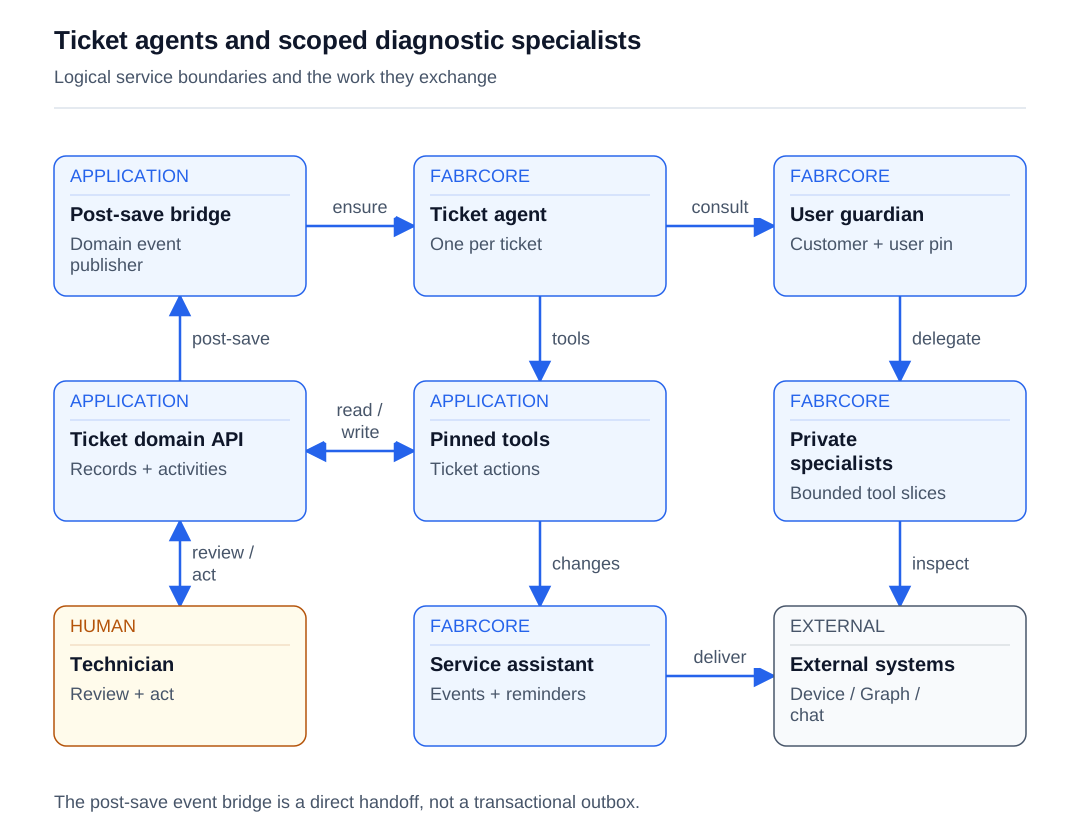
Read the diagram as text
- After the ticket is saved, the bridge ensures its agent.
- Ticket domain services commit before invoking the post-save event bridge.
- The ticket agent sends an asynchronous diagnostic consultation to a user guardian.
- The ticket agent uses tools pinned to its ticket.
- Tools call existing ticket domain services.
- The guardian composes private specialists with bounded diagnostic tools.
- Specialists inspect eligible device and directory evidence.
- Technicians read findings and choose business actions through the domain API.
- Domain changes can notify a principal-owned service assistant.
- The service assistant can queue scheduled results to a configured delivery endpoint.
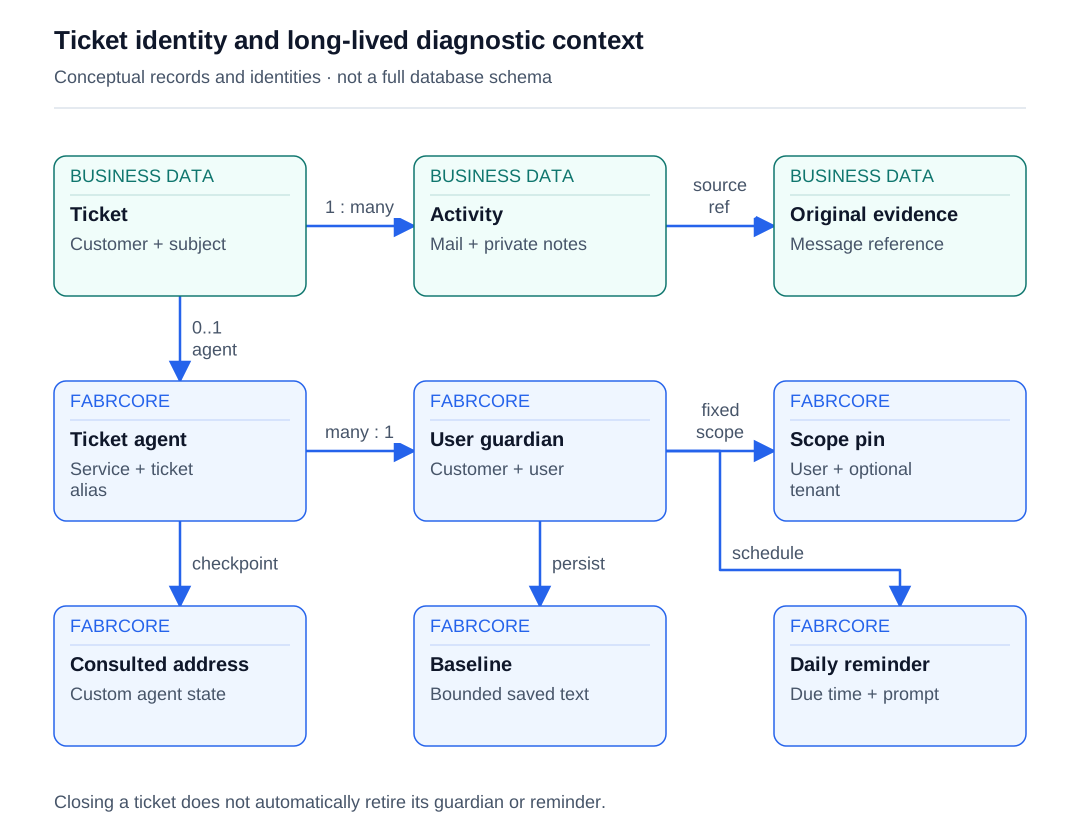
Read the diagram as text
- A ticket has communication and activity records.
- Email activity preserves original message evidence.
- A saved ticket may exist before its logical agent has been ensured.
- Multiple tickets can consult the same guardian for a customer and user.
- The guardian is configured with trusted customer and user scope.
- The ticket agent records the last consulted user address.
- The guardian keeps a bounded baseline separately from ticket data.
- The guardian registers a daily reminder independently of ticket closure.
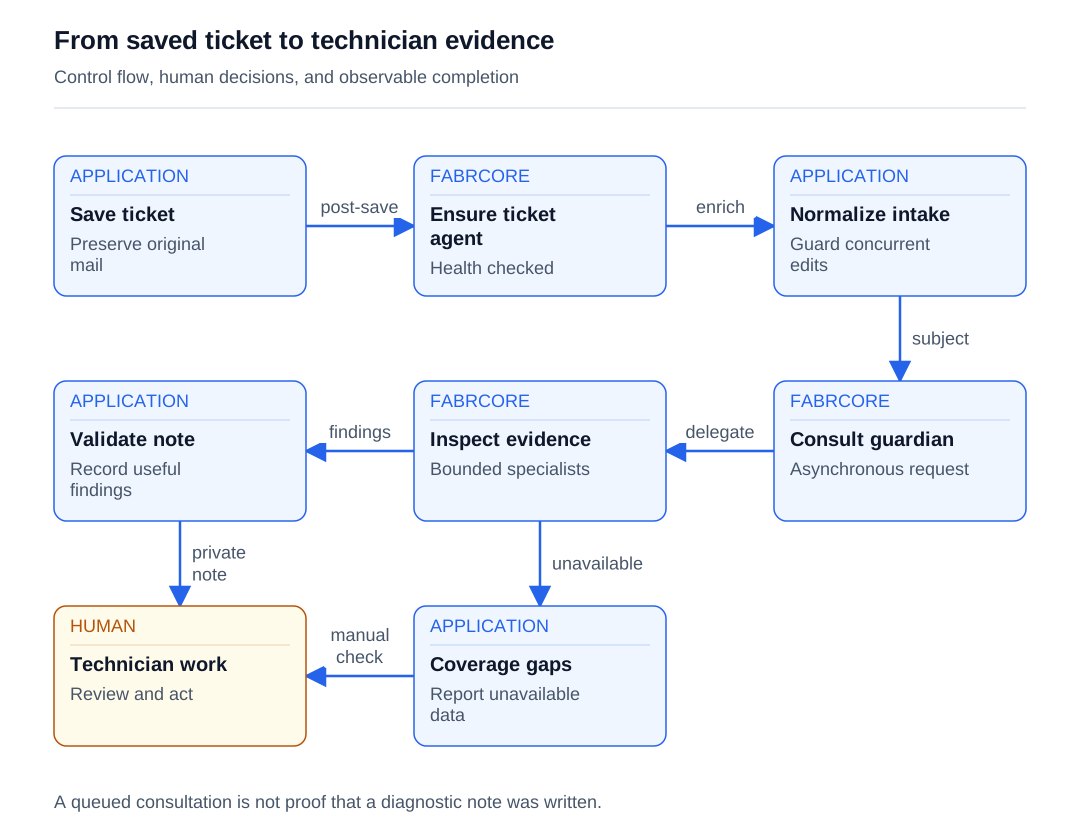
Read the diagram as text
- Provisioning starts after the ticket commit.
- A private agent can normalize eligible email descriptions.
- Trusted subject resolution selects or provisions the guardian.
- The guardian delegates bounded diagnostic work.
- Usable results pass through a validated private-note writer.
- The technician receives recorded evidence in the ticket.
- Offline systems, permissions, or unfinished work become explicit coverage gaps.
- The technician can continue with partial evidence and manual investigation.
ONE POSSIBLE CLIENT EXPERIENCE
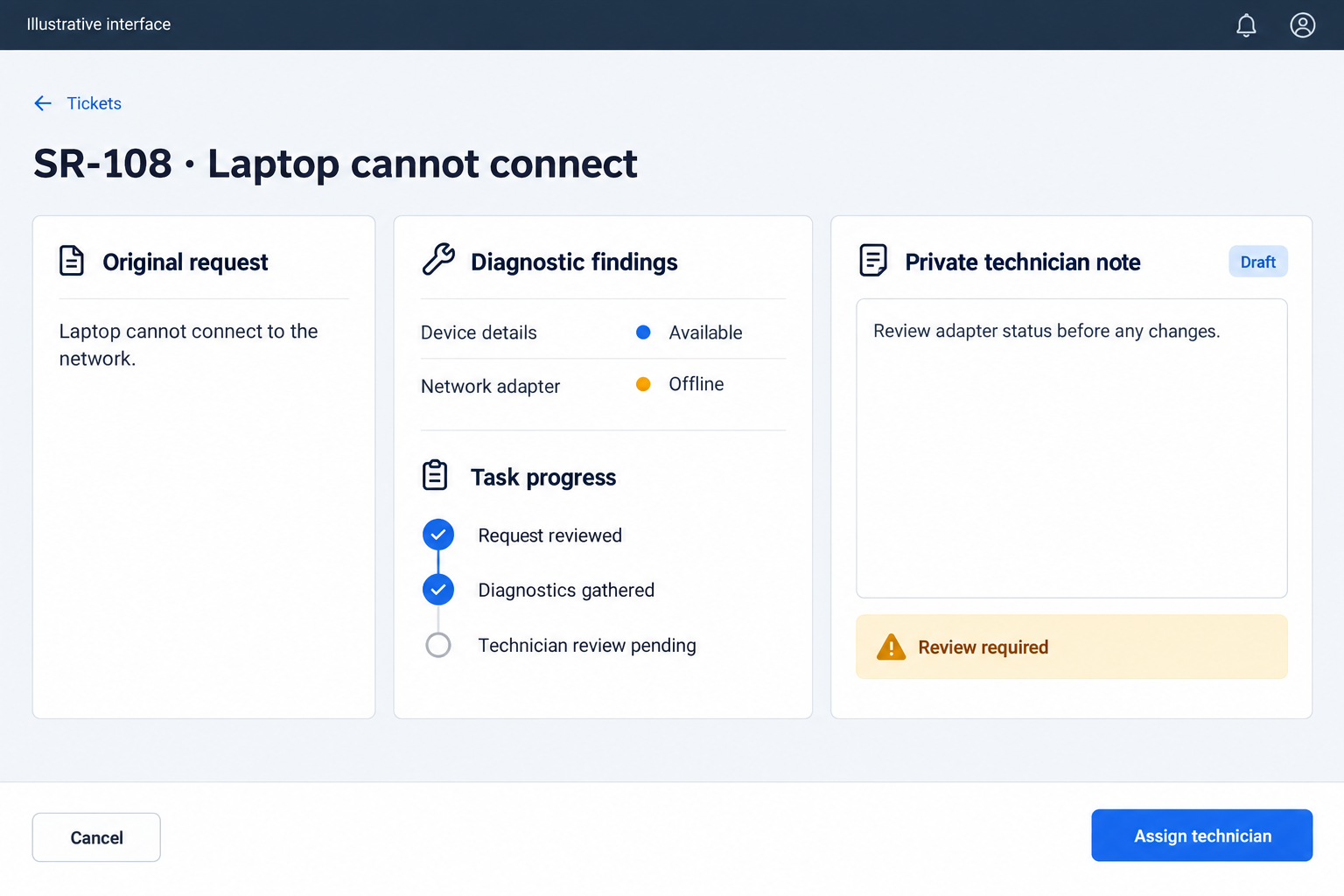
A possible web interface
Bring the original request, diagnostic coverage and private note into one workspace. The agents collect evidence; the technician reviews it and chooses the next business action.
Follow the work
- Resolve the incoming request, save the ticket and original email activity, and publish domain events after persistence.
- Ensure the ticket agent under a shared service principal with its ticket identity pinned in configuration.
- Normalize eligible email descriptions and attempt the pending customer acknowledgement.
- Resolve the affected person, ensure their guardian, and ask the ticket agent to request diagnostics.
- Use bounded internal specialists to inspect endpoint and directory evidence within configured scope.
- Return diagnostics asynchronously and record a validated private technician note.
- Let technicians inspect and update the ticket through its embedded chat and domain tools.
- Deliver relevant changes and scheduled checks through a principal-owned assistant; report incomplete work and recover deliberately.
Give each agent a clear lifetime
| Role | Lifetime | Responsibility | State |
|---|---|---|---|
| Ticket intake service | Application service invoked by mailbox polling | Resolve routing, deduplicate inbound mail, and persist ticket and communication records before agent work | Business database records and mailbox polling state |
| Ticket agent | Logical instance per ticket; initialized again on activation | Handle ticket conversation, intake formatting, and guardian request/reply dispatch | Pinned configuration, conversation history, and last consulted user address |
| User guardian | Logical instance per customer and normalized user address, provisioned when needed | Coordinate scoped diagnostics and daily checks | Customer/user/optional tenant pin, harness state, and bounded daily baseline |
| Diagnostic specialists | Private internal agents composed during guardian initialization | Investigate specific endpoint or Microsoft 365 subjects through restricted tool slices | Internal execution context; no separate public agent handles are provisioned by this application code |
| Service assistant | Principal-owned conversational agent | Read service work, deliver change notifications, and schedule future checks | Harness context plus reminder prompt, due time, delivery endpoint, occurrence, and completion state |
| Technician | Authenticated application user | Review evidence, choose business actions, and perform work outside the diagnostic tools | Ticket history, work logs, and the user's conversations |
About the source and code examples
Based on a .NET 10 working tree using matched FabrCore 2.0.0-local.20260913200000 packages, read on 2026-09-13, including local host/configuration changes. Source-adapted excerpts use neutral identifiers and retain application helper dependencies; they are not standalone programs. Runtime deployment and test execution were outside this research.
Examples use neutral names. Application records, repositories and external adapters shown in excerpts are contracts you implement; they are not built-in FabrCore services. The client interface is yours to design.
Start with a ticket that already means something
Begin with a customer email saying that a workstation has become slow and mail sometimes fails to arrive. A useful investigation needs the affected person, customer, ticket number, description, priority, and service policy. The mailbox processor resolves whether incoming mail belongs to an existing conversation or needs a new ticket. It records message identifiers for duplicate detection, preserves the original email activity, and creates a customer-visible conversation entry where appropriate. FabrCore enters after this work produces a persistent record.
The unit of work collects domain events, saves database changes, runs local event handlers, and then calls the host-owned event publisher. That publisher translates ticket creation into agent provisioning. This ordering gives the agent something real to read: it does not create a parallel ticket inside a prompt. The original message remains available even when the short ticket description is later improved. Existing-thread mail is appended rather than treated as a fresh agent lifecycle every time.
Saving the ticket and provisioning its agent are separate operations. The publisher is a direct post-save call, not a transactional outbox. Initial agent provisioning can throw after the ticket has committed; optional enrichment failures are handled more leniently. Keep that distinction in the build: the ticket remains the source of truth, while missed agent provisioning needs a recovery path. A durable agent does not make the preceding database-to-agent handoff atomic.
Explore the features used here:
Put the runtime beside the domain services
Use a single application host for the domain services and FabrCore's Orleans silo. AddFabrCoreServer registers the server runtime; UseFabrCoreServer connects its endpoints and middleware. The application selects SQL Server mode, with a runtime override and requirement for deployed environments. This puts agents next to the services that own tickets, without replacing those services. Business records, framework history, and custom agent state still have different responsibilities and persistence boundaries.
Configure the runtime before adding agent work. The override below makes the deployed clustering choice explicit, and Require rejects an incompatible result. UseInMemoryAgentMessageMonitor adds operational message visibility; it does not turn monitoring into a durable audit trail. The model name default is a configuration lookup, not a model identifier embedded in the agent. Supply that profile, discovery configuration, authentication, and storage connections through the host's configuration system. The ticket agent can then depend on stable service contracts instead of constructing infrastructure during a conversation.
var options = new FabrCoreServerOptions()
    .UseInMemoryAgentMessageMonitor()
    .ConfigureRuntime("ServiceWorkflow.Hosting", context =>
    {
        if (context.EnvironmentName is "staging" or "production")
        {
            const string mode = "FabrCore:Orleans:ClusteringMode";
            context.Override(mode, "SqlServer",
                "Deployed instances share SQL membership and durable state.");
            context.Require(mode, value => string.Equals(
                value, "SqlServer", StringComparison.OrdinalIgnoreCase),
                "Deployed instances require SQL Server clustering.");
        }
    });
builder.AddFabrCoreServer(options);
// Later, after building the host and configuring authentication:
app.UseFabrCoreServer();
Explore the features used here:
Give each ticket a stable identity and a pinned tool scope
AgentConfiguration separates an instance handle from its agent type. The ticket number is normalized into an alias, with the ticket identifier used as a fallback. The application owns the handle-building helper. AgentType selects the class registered with AgentAlias; Models selects the configured model profile; Plugins names the tool plugin. Args carries the immutable business identity needed by that plugin. A full address combines the owning service principal and instance alias.
The publisher ensures the application's ACL entities, calls EnsureAgentsAsync with this configuration, and checks the returned health. A configured result must not be unhealthy or unconfigured. A client can request forced reconfiguration to reconnect an existing ticket with a working agent. These operations provision a logical instance; they do not mean an object stays resident forever. OnInitialize reconstructs executable clients and tools when the framework activates it.
internal static AgentConfiguration ConfigureTicket(
    Guid ticketId, string ticketNumber, bool forceReconfigure = false) => new()
{
    Handle = TicketAlias(ticketNumber, ticketId),
    AgentType = "service-ticket-agent",
    Models = "default",
    Description = $"Dedicated service agent for {ticketNumber}",
    Plugins = ["service-ticket"],
    Args = new Dictionary<string, string>
    {
        ["service-ticket:TicketId"] = ticketId.ToString(),
        ["service-ticket:TicketNumber"] = ticketNumber
    },
    ForceReconfigure = forceReconfigure
};var health = await agentService.EnsureAgentsAsync(
"service-manager",
[ConfigureTicket(ticketId, ticketNumber)]);
var result = health.Single();
if (!result.IsConfigured ||
result.State is HealthState.Unhealthy or HealthState.NotConfigured)
{
throw new InvalidOperationException(
$"Ticket agent could not be configured: {result.Message}");
}Explore the features used here:
Make the model work through the existing domain
The ticket agent derives from FabrCoreAgentProxy. During initialization it validates the pinned identifier, resolves its service-account domain service, installs a default system prompt when none was supplied, and calls ResolveConfiguredToolsAsync. CreateChatClientAgent returns both the executable agent and its session. The application keeps those references for conversational turns. OnMessage creates a response envelope, runs the model with the session, and returns the collected text. Machine messages take a separate branch before this conversation code.
Tool results should describe committed facts. The plugin's write wrapper sets a working status, invokes the domain operation, rereads the ticket, and returns a result containing success, the action, an optional created identifier, and the current record. Exceptions produce an error result, and a finally block clears the working status. That gives the model a concrete basis for its reply and prevents a successful-looking sentence from substituting for a domain operation. The service account supplies execution authority; the agent handle supplies attribution.
The plugin implements IFabrCorePlugin and reads the ticket pin in InitializeAsync. Its tools expose concrete business actions: read the ticket, assign a technician, change the work plan, add comments, log time, update billing, resolve, or close. They call the existing domain services with the stored identifier and an actor handle. The model never supplies a replacement ticket identifier. Description attributes explain each tool's purpose and parameters. Tool scope therefore has an executable boundary rather than relying entirely on a system prompt.
public override async Task OnInitialize()
{
    // Adapted excerpt: validate the ticket pin and prepare domain services first.
    var tools = await ResolveConfiguredToolsAsync();
    var result = await CreateChatClientAgent(
        config.Models ?? "default",
        threadId: config.Handle ?? fabrcoreAgentHost.GetHandle(),
        tools: tools);
    _agent = result.Agent;
    _session = result.Session;
    // The source also creates private intake and note-writing agents here.
}[Description("Closes the pinned ticket after explicit user confirmation.")]
public Task<string> CloseTicket(
[Description("True only after explicit user confirmation")]
bool userConfirmed = false) =>
userConfirmed
? Write("close ticket", () => _servicing.CloseTicketAsync(
_ticketId, new TicketActorRequest(_actorId)))
: Task.FromResult(
"BLOCKED: Ask the user to explicitly confirm closing this ticket.");Explore the features used here:
Improve the description without losing the request
An email-created ticket receives a one-way intake message. Its handler uses a private internal agent to turn the description and attached email chain into structured output. CreateInternalAgentAsync supplies a focused specialist with SerializedReadOnly execution, a sixty-second timeout, one concurrent operation, and sensitive telemetry disabled. It receives no business mutation tool. Trusted application code parses the result and decides whether any update is appropriate.
Include the email chain as evidence, with direction, subject, body, sender, and date, rather than flattening it into a new instruction. Internal forwards can contain the original customer's issue plus unrelated routing text. The processor retains the complete received body even when it selects a smaller customer block for routing. The specialist's job is to extract a technician-ready description from that evidence, while the original communication remains available for review.
The normalizer can decline an update. Invalid output also leaves the description unchanged. Before applying a valid replacement, the handler rereads the ticket and verifies that its source and original description still permit the change. This catches an observed concurrent-edit window, although it is not a substitute for atomic database concurrency control. Afterwards the handler attempts the pending customer acknowledgement and reports sent, suppressed, not-pending, or failed outcomes. A formatting failure does not skip that acknowledgement attempt. The sequence keeps the original evidence and gives automation a limited editorial job.
Explore the features used here:
Hand off diagnostics without holding an investigation call open
A ticket can identify its subject at creation or when a technician later assigns a contact. Trusted application code resolves that address to a customer before ensuring a guardian. Configuration pins the customer, normalized user address, and optional Microsoft 365 tenant. An unresolved contact is not guessed. The guardian is provisioned on demand rather than automatically for every directory contact, avoiding a daily reminder for people who never need service.
The publisher sends a kickoff to the ticket agent. That agent rereads its ticket, verifies that the requested address identifies its subject, and checks stored consultation state. It then sends an AgentMessage with Kind.Request on the application's a2a channel. This is internal message routing, distinct from the separately configured external A2A protocol endpoint. State carries reply correlation fields. The host routes the later response; application code does not wait for the complete diagnostic investigation inside this send. After sending, the ticket agent flushes the consulted address to custom state.
await fabrcoreAgentHost.SendMessage(new AgentMessage
{
    ToHandle = guardianHandle,
    Channel = "a2a",
    MessageType = "user-guardian:ticket-opened",
    Kind = MessageKind.Request,
    Message = BuildBrief(ticket, email),
    State = new Dictionary<string, string>
    {
        ["guardian.userEmail"] = email,
        ["guardian.customerId"] = customerId.ToString("d")
    }
});
SetState("guardian-consulted-user-v1", email);
await FlushStateAsync();
Explore the features used here:
Compose specialists around the evidence they can actually read
The guardian uses six configured plugins to compose ten internal specialists. Five cover endpoint discovery, machine state, software, compliance, and live queries. Five inspect identity, managed devices, mailbox, workspace, and file audit evidence through slices of a Graph plugin. ResolveInternalAgentToolsAsync classifies the complete plugin tool set; the application then selects each specialist's allowed functions. Missing expected tools fail initialization instead of quietly shrinking the investigation.
CreateFabrCoreHarnessAgent adds a todo-driven execution loop and background delegation to the guardian proxy. The guardian allows eighteen iterations, with ConcurrentReadOnly specialists, bounded concurrency, and explicit timeouts. For the slow-workstation request, machine state and software history can explain what changed, while mailbox and identity evidence address missing mail. Stored endpoint data can answer while a device is offline; live queries queue diagnostic commands and wait within a separate budget. An unavailable tenant, permission, or device becomes a coverage gap. The final response appends lost delegations and unfinished todos. Some tools inspect other devices within the pinned customer; device guards enforce customer ownership.
var specialist = await CreateInternalAgentAsync(new InternalAgentOptions
{
    Name = "machine-state-analyst",
    Description = "Reads stored machine evidence within the configured scope.",
    Instructions = "Use supplied tools; report unavailable checks as gaps.",
    Model = config.Models ?? "default",
    Tools = selectedTools,
    ToolRisks = toolNames.ToDictionary(
        name => name, _ => InternalAgentToolRisk.Read,
        StringComparer.OrdinalIgnoreCase),
    ExecutionPolicy = InternalAgentExecutionPolicy.ConcurrentReadOnly,
    Timeout = TimeSpan.FromSeconds(120),
    MaxConcurrency = 2,
    EnableSensitiveTelemetryData = false
});
// The source registers ten specialists; this excerpt shows one.
_harness = await CreateFabrCoreHarnessAgent(
    config.Models ?? "default",
    threadId: $"user-guardian:{_pin.CustomerId:n}:{_pin.UserUpn}",
    tools: [PinTool(fleetScope)], // Application helper selects GetPinnedUser.
    options =>
    {
        options.LoopMode = HarnessLoopMode.Todo | HarnessLoopMode.Background;
        options.BackgroundAgents = [specialist.AsBackgroundAgent()];
        options.LoopMaxIterations = 18;
        options.MissingPlanModeBehavior = MissingPlanModeBehavior.SelectExecution;
    });
Explore the features used here:
Put the findings where the technician works
The guardian returns a typed diagnostic response. The ticket agent handles it before ordinary chat, checks the sender principal as a routing sanity filter, and invokes a private note-writing specialist. Application code validates that specialist's structured output and adds a private comment through the domain service. The attribution line is constructed in code. Unsupported machine message types stop at this dispatcher instead of entering a technician's conversational history. A no-diagnostics result or unusable note produces no ticket activity; useful findings become a durable work record.
Keep the client contract small: send an AgentMessage to the ticket handle, consume the reply, and reload the business record when MessageType is data-changed. The agent marks conversational turns this way without asking the model to classify whether a mutation occurred. The technician reviews evidence, assigns work, records time, and moves the ticket through its lifecycle. Closing and deleting selected records require a confirmation boolean in the tool contract. AI-generated findings do not supply final human approval: this boolean is a model-facing guard, not a separately authenticated approval ceremony.
Explore the features used here:
Continue later with explicit reminder state
The assigned technician's service assistant closes the follow-up loop. Ticket-change events are enriched with the saved ticket and actor, then sent to that technician's principal-owned agent; changes made by the owner suppress redundant proactive delivery. The assistant can also schedule a request such as checking tomorrow whether the ticket remains unresolved. Its eight-iteration todo harness uses read tools, while its reminder function stores the complete prompt, due time, recurrence, delivery endpoint, occurrence counter, and completion flag. RegisterReminder arranges later work. On activation it restores saved reminders; when one fires it reads live ticket data and uses SendToUserAsync with PrincipalDeliveryTarget to queue the answer for Microsoft 365 Copilot.
The guardian also registers a daily reminder, compares model output with a stored baseline, and suppresses a NO_CHANGES result. Its baseline is bounded to four thousand characters and persisted with SetState followed by FlushStateAsync. This is explicit custom agent state, separate from conversation history and from authoritative ticket records. The implementation should not be described as a structured, deterministic configuration diff: the baseline is model-written text, and unchanged detection uses a marker.
Scheduling requires an eligible personal conversation with a proactive delivery endpoint; the assistant rejects requests without one. It saves the reminder before registering it, so activation can restore the complete prompt. For a one-time check, it uses an occurrence-based outbound identifier, queues the answer, persists completion, and unregisters the reminder. A recurring check advances its next due time beyond the present rather than replaying every missed interval. Delivery and state persistence remain separate steps. Keep the saved prompt self-contained so tomorrow's check does not depend on transient wording from today's request.
private async Task WriteBaselineAsync(string result)
{
    var trimmed = result.Length > 4000 ? result[..4000] : result;
    SetState(BaselineStateKey, trimmed);
    await FlushStateAsync();
}

// Initialization excerpt: the application supplies the reminder constants/prompt.
await fabrcoreAgentHost.RegisterReminder(
    DailyCheckReminderId,
    DailyCheckMessageType,
    dailyPrompt,
    dueTime: DailyPeriod + jitter,
    period: DailyPeriod);
Explore the features used here:
Define completion and recovery at each boundary
Finish the workflow against the ticket: preserve intake, apply valid description improvements, record useful findings, and commit technician actions through domain rules. The guardian's diagnostic tools do not repair the workstation or change mailbox policy. They provide evidence for the technician's next action. A queued request is not a completed investigation, and queued proactive delivery does not mean a person received or read the answer. Operational status should describe those stages separately.
Design recovery around the actual checkpoints. Consultation send and state flush are separate, so a crash can duplicate work; the stored consulted address also cannot prove a reply arrived. The daily baseline is saved before delivery, so failed delivery needs deliberate retry handling. Narrow the current all-principals guardian read/message grants before offering restricted customer or technician access. Pins limit the data a tool reaches, while ACLs limit who may ask it. For stronger guarantees, add an outbox, durable work/result identifiers, and independently authenticated approval where needed. These are concrete extensions to this workflow, not guarantees supplied by its conversational layer.
Explore the features used here:
Prove the workflow end to end
Use these acceptance scenarios as you implement the story. They describe checks to run in your environment.
- Submit a new customer email, verify one persistent ticket and original email activity, then replay the same message identifiers and verify no duplicate ticket.
- Verify the ticket event provisions the expected service principal and alias with the saved ticket identifier in plugin Args.
- Return malformed normalization output and separately edit the description during normalization; verify the original or human-edited description is retained.
- Assign a resolvable contact and verify guardian provisioning, typed request/reply routing, and a validated private note for useful diagnostics.
- Repeat contact assignment for the same address, then assign a different person; inspect consultation suppression and renewed investigation behavior.
- Supply a device identifier belonging to another customer and verify refusal before diagnostic execution; separately assess same-customer access policy.
- Take the endpoint offline and omit the tenant integration; verify coverage gaps appear instead of a clean-health claim.
- Force a specialist timeout or exhaust the harness budget and verify unfinished work is visible in the result.
- Call CloseTicket with confirmation false and verify no close command is issued; test confirmed execution against domain lifecycle rules.
- Schedule a one-time service check, reactivate its agent, and verify restored scheduling, live data lookup, stable occurrence identity, and completion bookkeeping.
- Interrupt execution between ticket commit and event publication, between diagnostic send and state flush, and between baseline save and delivery; document recovery rather than assume atomicity.
- Exercise caller access under the deployed ACL before sharing guardian chat, and validate the policy that will replace the broad source grants.
Implementation notes
Model profiles, discovery/configuration sources, SQL connections, authentication, and external credentials are deployment prerequisites omitted from the excerpts.
Guardian diagnostic tools do not expose endpoint remediation, but live reads can enqueue commands and refresh persisted inventory. Read-only does not mean no infrastructure side effects.
Pins constrain data access, while ACLs constrain who can invoke or read an agent. Current broad grants do not establish per-technician or per-customer caller isolation.
The internal a2a channel is a routing convention, not sender authentication. Principal identity and access policy remain separate checks.
SQL grain state and reminders do not imply durable message queues. The framework's default SQL stream mode is Memory; a durable stream provider must be configured separately. The post-save handoff still needs explicit replay support, and diagnostic send, note persistence, and delivery remain separate operations. Ticket closure does not retire its guardian or daily reminder.
Daily comparison uses bounded model-written text and a marker, not a structured deterministic diff. User reminder jitter uses a runtime string hash and can change across processes.